Lesson 15 LearningExplainers
Windows XP turns 25: the little green hill
This October marks 25 years since a rolling green hill and a blue sky took over the world. Windows XP went on sale on 25 October 2001, and it became the operating system a whole generation grew up on. It was stable, it was friendly, and it refused to die for about thirteen years. Let me take you back, show you what made it special, and share a few tricks that still work today.
Fair warning: if you used XP, the next few minutes may make you a little nostalgic.
Why XP was a big deal in 2001
Before XP, home Windows and work Windows were two different beasts. Home users had Windows 95, 98 and Me, built on old MS-DOS code that loved to crash. Businesses had the sturdier Windows NT and 2000. XP, codenamed “Whistler”, merged the two. For the first time, your home PC ran on the solid NT engine, with the friendly face on top.
The difference was night and day. The dreaded “blue screen of death” went from a daily visitor to a rare guest. You could run more programs at once without the whole thing falling over. XP, by the way, stands for “experience”, and for once the marketing was about right.
The features everyone remembers
XP traded the grey boxes of Windows 98 for the bright Luna look: a blue taskbar, a green Start button and a red close button. Some people called it toy-like. Most of us loved it. Click the Start button below to see the big change. The two-column menu put your programs on one side, and your files on the other.
<div class="xpd">
  <div class="menu">
    <p class="menu__hd">A two-column Start menu, the big idea in 2001</p>
    <div class="menu__cols">
      <div class="col col--apps">
        <span class="col__tag">Your programs</span>
        <div class="item"><i class="g g--blue"></i>Internet</div>
        <div class="item"><i class="g g--amber"></i>E-mail</div>
        <hr>
        <div class="item"><i class="g"></i>Media Player</div>
        <div class="item"><i class="g"></i>Movie Maker</div>
        <div class="item"><i class="g"></i>Paint</div>
        <div class="item"><i class="g"></i>Minesweeper</div>
      </div>
      <div class="col col--places">
        <span class="col__tag">Your files</span>
        <div class="item"><i class="f"></i>My Documents</div>
        <div class="item"><i class="f"></i>My Pictures</div>
        <div class="item"><i class="f"></i>My Music</div>
        <div class="item"><i class="f"></i>My Computer</div>
        <hr>
        <div class="item"><i class="c"></i>Control Panel</div>
        <div class="item"><i class="c"></i>Help and Support</div>
      </div>
    </div>
    <div class="menu__ft"><span>Log Off</span><span>Turn Off Computer</span></div>
  </div>
  <div class="bar">
    <label class="start"><input type="checkbox" id="st"><b>start</b></label>
    <span class="clock">2:25 PM</span>
  </div>
</div>
.xpd{font-family:"DM Sans",system-ui,sans-serif;max-width:480px;margin:0 auto;position:relative;background:linear-gradient(#8fb7e8,#cfe0f5);border:1px solid #c8d4e3;border-radius:14px;padding:16px 16px 60px;min-height:260px}
.menu{display:none;background:#fff;border:1px solid #b9c4d2;border-radius:10px;overflow:hidden;box-shadow:0 10px 30px rgba(20,30,50,.22)}
.menu__hd{margin:0;font-family:Manrope,sans-serif;font-weight:800;font-size:14px;color:#fff;background:#2a5bb5;padding:12px 14px}
.menu__cols{display:flex}
.col{flex:1;padding:10px 8px}
.col--apps{background:#fff}
.col--places{background:#eef3fb;border-left:1px solid #dce4ef}
.col__tag{display:block;font-family:"Space Mono",monospace;font-size:10px;letter-spacing:.06em;text-transform:uppercase;color:#7b8699;padding:0 8px 6px}
.item{display:flex;align-items:center;gap:9px;padding:7px 8px;border-radius:7px;font-size:14px;color:#1b2430;cursor:pointer}
.item:hover{background:#FFD400}
.col hr{border:0;border-top:1px solid #dce4ef;margin:6px 8px}
.g,.f,.c{width:18px;height:18px;border-radius:4px;flex:0 0 auto;background:#9aa7ba}
.g--blue{background:#2a6df0}
.g--amber{background:#f0a21e}
.f{background:#f2c14e;border-radius:3px 3px 4px 4px}
.c{background:#6fae5f}
.menu__ft{display:flex;gap:18px;justify-content:flex-end;background:#2a5bb5;padding:9px 14px;color:#dbe6fb;font-size:13px}
.menu__ft span{cursor:pointer}
.menu__ft span:hover{color:#fff;text-decoration:underline}
.bar{position:absolute;left:0;right:0;bottom:0;height:44px;background:linear-gradient(#3a7fe0,#2357b8);border-radius:0 0 13px 13px;display:flex;align-items:center;justify-content:space-between;padding:0 14px 0 0}
.start{display:inline-flex;align-items:center;cursor:pointer;height:44px}
.start input{position:absolute;opacity:0;width:0;height:0}
.start b{font-family:Manrope,sans-serif;font-style:italic;font-weight:800;font-size:19px;color:#fff;background:linear-gradient(#5bbf4a,#3f9b32);padding:9px 26px 9px 18px;border-radius:0 0 13px 18px;letter-spacing:.3px}
.xpd:has(#st:checked) .start b{filter:brightness(1.12)}
.clock{font-size:13px;color:#eaf1fd}
.xpd:has(#st:checked) .menu{display:block}There was a lot more under the hood, and plenty of it we still use today in one form or another:
- System Restore. Broke something? Roll the whole PC back to yesterday. A time machine for your computer, and a lifesaver.
- Fast User Switching. Swap to another person’s account without closing your programs. Normal now, new and clever then.
- ClearType. Font smoothing made for flat LCD screens, which were just taking over from big glass monitors. Text suddenly looked crisp.
- Built-in CD burning. Drag files onto the CD icon and burn them, with no extra software. This felt like magic in 2001.
- Remote Desktop. Control one PC from another across the network. The same idea powers a lot of remote work today.
It also shipped with the games that ate our lunch breaks: Solitaire, Minesweeper, FreeCell and the glorious 3D Pinball: Space Cadet. And who could forget Rover, the cartoon dog that sat in the search box and wagged his tail while you looked for a file.
The wallpaper seen by a billion people
That green hill has a real story. It’s a true photo, not a painting, called “Bliss”. A photographer named Charles O’Rear took it in January 1996, on a drive through the wine country near Napa Valley in California. He used a film camera on a tripod, and he says he never touched up the colours. The hill was that green after a wet winter.
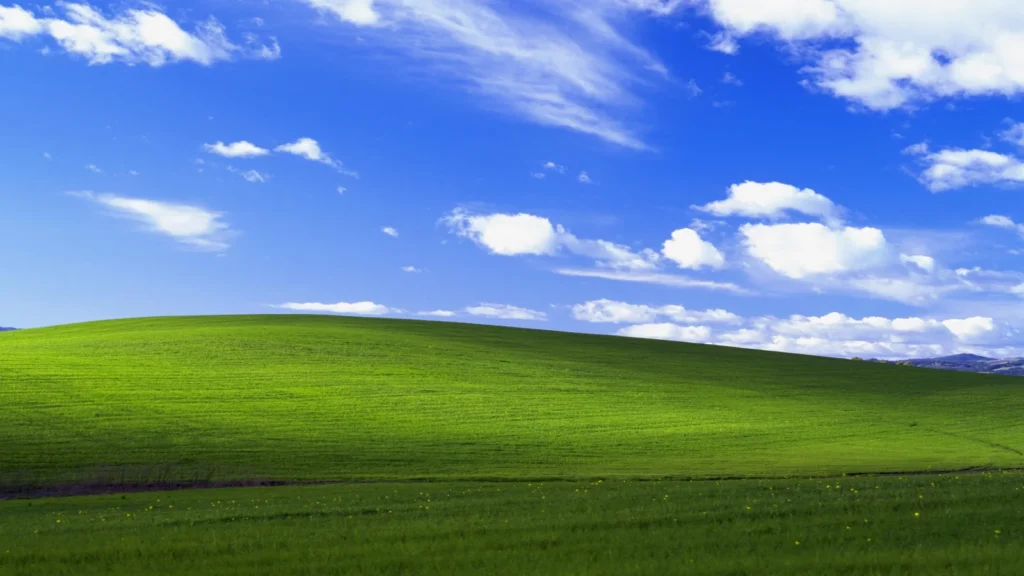
Microsoft picked it as the default background, so it loaded on hundreds of millions of screens around the world. O’Rear has guessed it may be the most viewed photograph in history. I believe it. The funny part is the hill itself. The vineyards have grown back since, so if you drove there today, you wouldn’t recognise it.
How big did XP get
Enormous, and for a very long time. XP sold more than 17 million copies in its first two months, faster than any Windows before it. Sales passed 210 million by 2004. Nobody has an official lifetime total, but estimates sit between half a billion and a billion machines.
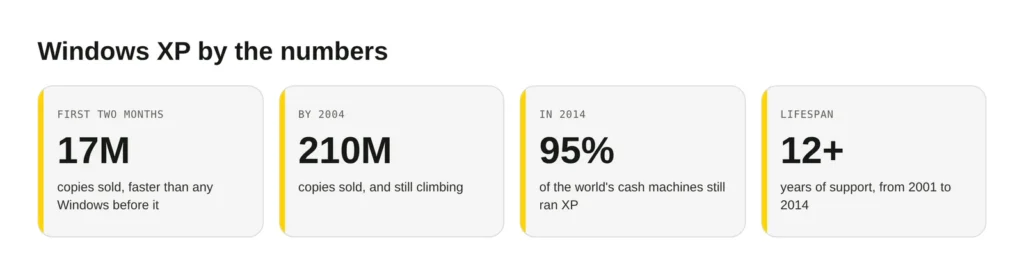
Here’s the part that still amazes me. Windows 7 came out in 2009, and XP stayed the most used operating system in the world until around 2012. Even in early 2014, when Microsoft finally pulled support, close to a third of PCs still ran it. At that point about 95% of the world’s cash machines ran on XP too. The US Navy liked it so much it paid Microsoft millions a year to keep patching it after everyone else had stopped.
Three XP tricks that still make me smile
Some of these habits are burned into my fingers. Two of them still work on a modern PC, so try them now.
First, the Notepad diary trick. Open Notepad, type .LOG as the very first line, in capitals, then save the file. Every time you open it after that, Windows stamps the date and time at the bottom, ready for your next note. A free diary, hiding in Notepad since the 1990s:
.LOG

14:32 01/11/2026
Fixed the printer. Again.
Second, the Space Cadet pinball cheats. In 3D Pinball, type hidden test (you won’t see anything happen), then hold the left mouse button to drag the ball anywhere you like. Want to never lose? Type 1max for extra balls. It’s a wonderful way to lose an afternoon instead of doing your homework.
Third, the Windows key shortcuts that XP made famous. Win + D shows the desktop, Win + E opens a file window, and Win + L locks the screen. All three still work today. Muscle memory, twenty-five years strong.
XP had a good run, but running it now is a real security risk, which is the whole reason it finally retired. It’s the same reason I nag clients to keep their sites patched and current. If your business is leaning on ageing software, our site updates service can help you move on safely. Happy birthday, old friend.


Comments
No comments yet. Questions, fixes and better ways are all welcome.