Lesson 13 LearningExplainers
What is an API? How it works, how safe it is, and its limits

An API (application programming interface) is a door one program uses to ask another program for data or actions. Your shop uses one when it takes a Stripe payment, and an app uses one to load your Shopify products. If you understand requests and responses, you understand most of it.
Below I explain how APIs work, how safe they are, their limits, how to test one, and how webhooks call you back. At the end, I show how to offer an API of your own.
What an API is, in one restaurant
Think of a restaurant. You don’t walk into the kitchen. You give your order to the service window, in a format the kitchen understands, and food comes back out. The menu is the API documentation. The window is the API.
On the web, the order is an HTTP request and the food is a response. Most web APIs are REST APIs. In REST, each thing has its own address (a URL). You use standard HTTP methods on it: GET reads, POST creates, PUT or PATCH changes, and DELETE removes. The data usually travels as JSON, a simple text format of names and values.
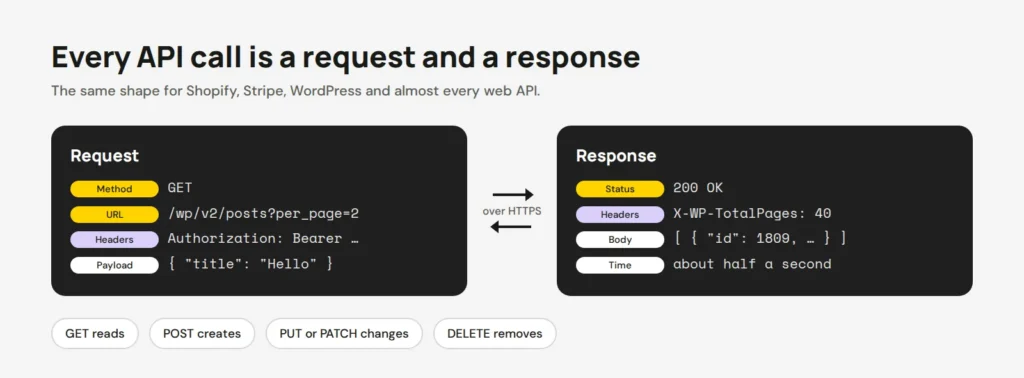
Every response starts with a status code. 200 means OK and 201 means created. 401 means “who are you?”, 404 means not found and 429 means slow down. Anything starting with 5 means the server broke. Computers are very polite about telling you exactly why they said no.
Try a request: pages, payloads and limits
Pick a request and a key below, and watch what comes back. It’s a pretend API, but the replies follow the same rules as real ones.
<div class="api">
<div class="opts">
<p class="grp" role="radiogroup" aria-label="Request">
<span>Request</span>
<input type="radio" name="r" id="r1" checked><label for="r1">List products</label>
<input type="radio" name="r" id="r2"><label for="r2">Next page</label>
<input type="radio" name="r" id="r3"><label for="r3">Add a product</label>
</p>
<p class="grp" role="radiogroup" aria-label="Key">
<span>API key</span>
<input type="radio" name="k" id="k1" checked><label for="k1">Valid key</label>
<input type="radio" name="k" id="k2"><label for="k2">No key</label>
<input type="radio" name="k" id="k3"><label for="k3">Too many calls</label>
</p>
</div>
<div class="panes">
<div class="pane req">
<small>You send</small>
<pre class="q q1">GET /v1/products?limit=2</pre>
<pre class="q q2">GET /v1/products?limit=2&after=prod_2</pre>
<pre class="q q3">POST /v1/products
Content-Type: application/json
{ "name": "Linen shirt", "price": 79 }</pre>
<pre class="auth">Authorization: Bearer sk_test_…</pre>
</div>
<div class="pane res">
<small>You get back</small>
<pre class="a a1"><b class="ok">200 OK</b>
{
"data": [
{ "id": "prod_1", "name": "Mug" },
{ "id": "prod_2", "name": "Tote bag" }
],
"has_more": true
}</pre>
<pre class="a a2"><b class="ok">200 OK</b>
{
"data": [
{ "id": "prod_3", "name": "Vase" }
],
"has_more": false
}</pre>
<pre class="a a3"><b class="ok">201 Created</b>
{ "id": "prod_4", "name": "Linen shirt",
"price": 79 }</pre>
<pre class="a e401"><b class="bad">401 Unauthorized</b>
{ "error": "Missing or invalid API key" }</pre>
<pre class="a e429"><b class="bad">429 Too Many Requests</b>
Retry-After: 2
{ "error": "Rate limit reached. Slow down." }</pre>
</div>
</div>
<p class="tip"></p>
</div>.api { width: min(100%, 680px); }
.grp { display: flex; flex-wrap: wrap; align-items: center; gap: 6px; margin: 0 0 8px; }
.grp span { width: 70px; font-size: 13px; color: #5C5E57; }
.grp input { position: absolute; opacity: 0; }
.grp label { padding: 6px 12px; border: 2px solid #171915; border-radius: 999px; background: #fff; cursor: pointer; font-size: 14px; }
.grp input:checked + label { background: #171915; color: #fff; }
.grp input:focus-visible + label { outline: 3px solid #5B4AE8; outline-offset: 2px; }
.panes { display: grid; grid-template-columns: 1fr 1fr; gap: 10px; margin-top: 6px; }
.pane { background: #1F1F1F; border-radius: 12px; padding: 10px 12px; min-height: 190px; }
.pane small { display: block; color: #9A9C94; font-size: 11px; text-transform: uppercase; letter-spacing: .08em; margin-bottom: 6px; }
.pane pre { margin: 0; color: #E6E6E6; font: 400 12.5px/1.5 "Space Mono", ui-monospace, monospace; white-space: pre-wrap; }
.auth { color: #FFD400 !important; margin-top: 6px !important; }
.ok, .bad { display: inline-block; padding: 1px 8px; border-radius: 6px; font-weight: 700; margin-bottom: 4px; }
.ok { background: #FFD400; color: #171915; }
.bad { background: #F2B8B5; color: #171915; }
.q, .a { display: none; }
.tip { margin: 10px 0 0; padding: 10px 12px; background: #fff; border: 2px solid #D7D7D7; border-radius: 10px; font-size: 14px; }
/* Which request */
.api:has(#r1:checked) .q1, .api:has(#r2:checked) .q2, .api:has(#r3:checked) .q3 { display: block; }
.api:has(#k2:checked) .auth { display: none; }
/* Which answer: errors win over the normal reply */
.api:has(#k1:checked):has(#r1:checked) .a1,
.api:has(#k1:checked):has(#r2:checked) .a2,
.api:has(#k1:checked):has(#r3:checked) .a3,
.api:has(#k2:checked) .e401,
.api:has(#k3:checked) .e429 { display: block; }
.tip::after { content: "Only 2 products came back. \"has_more\": true says there is another page, so ask for the next one."; }
.api:has(#r2:checked) .tip::after { content: "Pagination: \"after\" says where the last page ended. \"has_more\": false means you have everything."; }
.api:has(#r3:checked) .tip::after { content: "POST sends a payload (the JSON body). 201 means the server created something new."; }
.api:has(#k2:checked) .tip::after { content: "No key, no data. The server doesn't know who you are, so it says no."; }
.api:has(#k3:checked) .tip::after { content: "Rate limit. Wait as long as Retry-After says, then try again, a bit slower."; }
@media (max-width: 520px) { .panes { grid-template-columns: 1fr; gap: 6px; } .pane { min-height: 0; padding: 8px 10px; } .pane pre { font-size: 11.5px; } .grp { gap: 4px; } .grp span { width: 100%; font-size: 12px; } .grp label { padding: 4px 10px; font-size: 13px; } .tip { font-size: 13px; padding: 8px 10px; } }- Pagination. APIs send big lists in pages. WordPress gives you at most 100 items per request, and Stripe and Shopify use a cursor that says where the last page ended.
- Payload. The data you send or get back. Smaller is faster. Ask only for the fields you need.
- Rate limits. Every API caps how often you can call it. Stripe allows 100 requests per second in live mode and 25 in its test sandbox. Go over, and you get a 429.
- Speed. Each call travels across the internet and back, so ten small calls are slower than one good one.
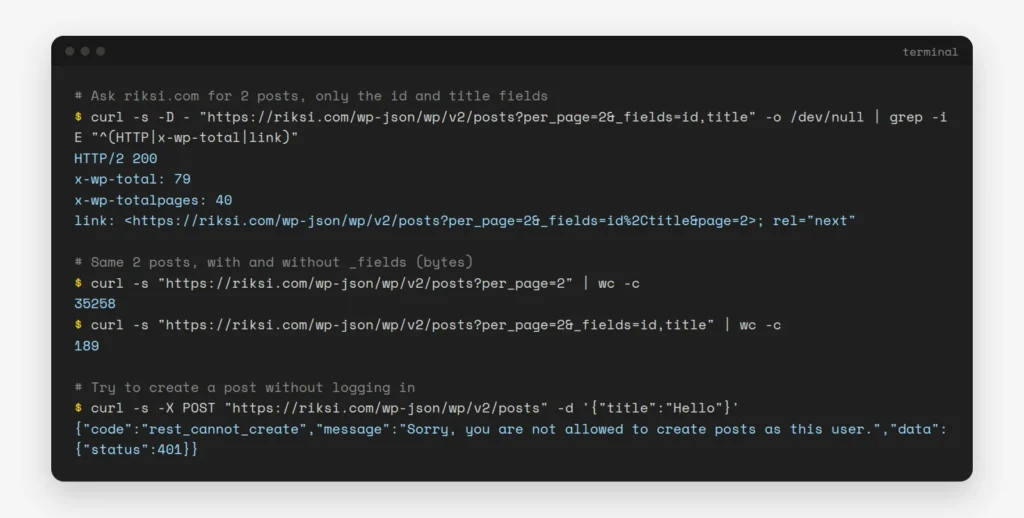
Here’s the real thing, against this site’s own WordPress API. Notice the page headers, and how much smaller the reply gets when I ask for two fields only:
How secure is an API?
As secure as the way you use it. The API itself is usually fine. The problems come from leaked keys and loose permissions. These are the rules I follow on every project:
- Always use HTTPS, so nobody can read the request on the way.
- Keep secret keys on your server. Never put them in JavaScript, a mobile app or a GitHub repo. Stripe’s publishable key is made for browsers, but the secret key is not.
- Give each key only the access it needs, like read-only for a report, and make a separate key per app.
- Change keys when someone leaves the team or a key might have leaked.
- If you build an API, check that each user can only see their own data. The OWASP API Security Top 10 puts “Broken Object Level Authorization” at number one. In plain words, user A asks for user B’s order and gets it.
My guide to sharing store logins safely covers the same idea for people instead of programs.
Test an API with Postman or curl
You don’t need to write code to try an API. Postman is an app where you build a request by filling in boxes. Its free plan is for one person, and collection runs are now unlimited on every plan, according to Postman.
- Create a new request and pick the method, like GET.
- Paste the URL, for example
https://riksi.com/wp-json/wp/v2/posts?per_page=2. - If the API needs a key, add it in the Authorization tab, not in the URL.
- Click Send and read the status code, the headers and the body.
- Save it to a collection, so you can run the same tests again later.
If you like the terminal, curl does the same in one line. My post on checking headers with curl shows the flags I use.
How Shopify and Stripe use APIs, and what a callback is
Almost every Shopify app talks to your store through Shopify’s Admin API. Shopify now calls its older REST Admin API “legacy”. New public apps in its App Store must use the GraphQL Admin API since April 2025. GraphQL is another style of API, where you ask for exactly the fields you want in one request.
Stripe is a good example of both directions. Your server calls Stripe’s API to start a payment. But the bank may take seconds or even days to confirm it, so your site can’t just wait. Instead, Stripe calls you back.
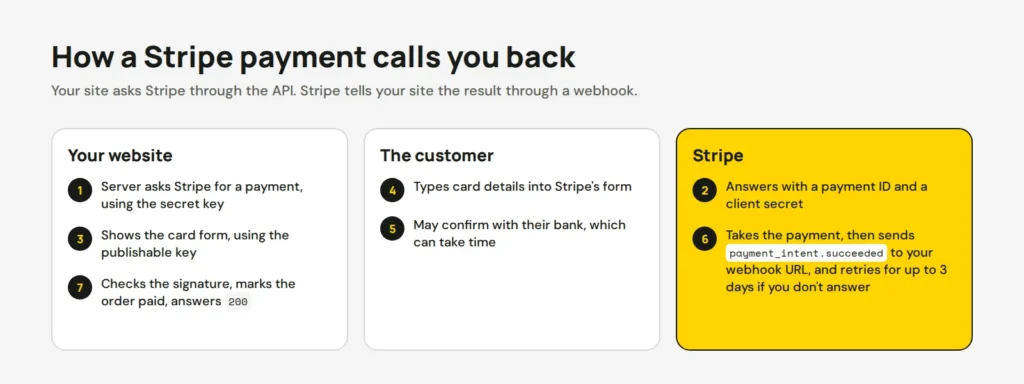
That callback is a webhook: a URL on your site that another service sends a message to when something happens. Stripe sends events like payment_intent.succeeded, signed with a Stripe-Signature header. Stripe’s docs say your endpoint must “quickly return a successful status code“. If it doesn’t hear back, Stripe retries for up to three days. Two rules matter most: always check the signature, and expect the same event twice now and then.
Can I offer my own API?
Yes, and WordPress makes a start easy, because it already has a REST API. You can add your own endpoint with register_rest_route(). This one returns the stock level of a WooCommerce product by its SKU:
add_action( 'rest_api_init', function () {
	register_rest_route( 'shop/v1', '/stock/(?P<sku>[A-Za-z0-9-]+)', array(
		'methods'             => 'GET',
		'permission_callback' => function () {
			return current_user_can( 'read' ); // only logged-in users or app passwords
		},
		'callback'            => function ( WP_REST_Request $request ) {
			$product = wc_get_product( wc_get_product_id_by_sku( $request['sku'] ) );
			if ( ! $product ) {
				return new WP_Error( 'not_found', 'No product with that SKU', array( 'status' => 404 ) );
			}
			return array( 'sku' => $product->get_sku(), 'stock' => $product->get_stock_quantity() );
		},
	) );
} );
Partners can then call /wp-json/shop/v1/stock/LINEN-01 with an application password. Selling API access as a service? Plan for these from day one:
- A version in the URL, like
v1, so you can change things later without breaking anyone. - Keys per customer, rate limits and logs, so one busy client can’t slow down everyone.
- Clear docs with examples. An API without docs is a door without a handle.
- Billing, often per request, which Stripe can handle too.
If you’d like help connecting your site to an API, or building one for your partners, our site updates service covers both.
Opens in a new tab


Comments
No comments yet. Questions, fixes and better ways are all welcome.