You’ve built a page in the editor, and now you want its content inside another template. I load the page with get_post() and run its content through apply_filters( 'the_content', $page->post_content ). That renders blocks, shortcodes and paragraphs the same way they appear on the page itself.
If you also need template tags like the_title(), use setup_postdata() instead. Either way, check that the page is published before you show it.
The quick way with get_post() and the_content filter
Put a small helper in your theme’s functions.php.
<?php
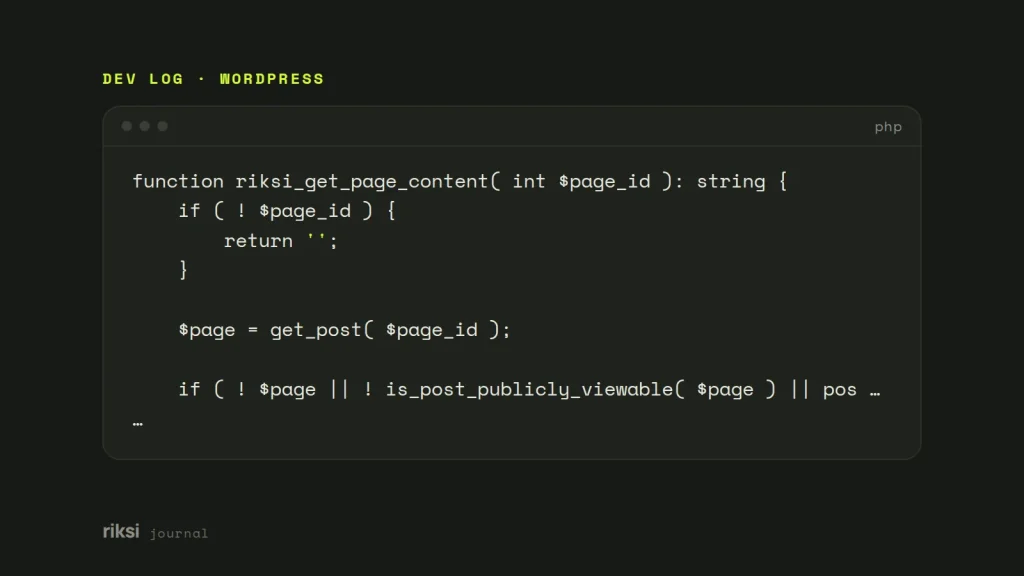
function riksi_get_page_content( int $page_id ): string {
	if ( ! $page_id ) {
		return '';
	}

	$page = get_post( $page_id );

	if ( ! $page || ! is_post_publicly_viewable( $page ) || post_password_required( $page ) ) {
		return '';
	}

	return apply_filters( 'the_content', $page->post_content );
}
Then call it anywhere in a template with echo riksi_get_page_content( 42 );. Each check is there for a reason, and I wouldn’t drop any of them.
- The empty ID guard. If you give
get_post()a0, it returns the current global post. Without the guard you’d print the page you’re already on. Inside a shortcode you’d loop forever. is_post_publicly_viewable()(WordPress 5.7 and later) returns false for drafts, private pages and non-public post types. Without it, unpublished content can leak onto a public page.post_password_required()respects password protection. It stops the protected text from being printed.
The the_content filter matters because stored content isn’t finished HTML. The filter renders blocks with do_blocks(), including dynamic blocks such as Latest Posts. It adds paragraphs to classic-editor content and runs shortcodes. It also adds srcset and lazy-loading attributes to images.
I’d avoid hard-coded IDs. The same page usually has a different ID on your local copy and on the live site. A page ID is like a locker number at a gym. It only means something at that gym. Looking the page up by its path works in both places. get_page_by_path( 'about/our-team' ) returns the post, and you pass its ID to the helper.
What can go wrong with the_content
- Plugin extras. Some plugins add share buttons, related posts or sign-up boxes to
the_content. They’ll add them here too. Well-behaved ones checkin_the_loop()andis_main_query(), but not all do. If extras appear, render the pieces yourself. Usedo_blocks()for block content (pluswpautop()for classic-editor content), thendo_shortcode(). - Loops. Page A may include page B while page B includes page A. PHP never gets bored of a loop. It runs until it hits the memory limit. The shortcode further down has a guard for this.
- The wrong global post. The filter runs while the outer page is still the global
$post. So anything that reads “the current post” sees the outer page. If that matters, use the next approach.
Use setup_postdata() for template tags
You may want the included page’s title, featured image or other template tags. In that case, make it the current post for a moment.
<?php
global $post;

$included = get_post( 42 );

if ( $included && is_post_publicly_viewable( $included ) && ! post_password_required( $included ) ) :
	$post = $included;
	setup_postdata( $post );
	?>
	<section class="included-page">
		<?php the_title( '<h2>', '</h2>' ); ?>
		<?php the_content(); ?>
	</section>
	<?php
	wp_reset_postdata();
endif;
Setting the global $post is the step people miss. Template tags read from it. Yes, it’s a global. It isn’t pretty, but WordPress has worked this way for a long time. setup_postdata() only fills in the related globals, such as page count, author and the more-tag state. wp_reset_postdata() puts the main query’s post back afterwards.
There’s one side effect. The included page isn’t the page being viewed. So the_content() respects a <!--more--> tag and shows only the teaser with a “more” link. If you want the full text, add $GLOBALS['more'] = 1; after setup_postdata().
Why get_the_content() sounds right but isn’t
get_the_content() returns the content as stored, without the the_content filter. Dynamic blocks don’t render. Shortcodes stay as text in brackets. Classic-editor content has no paragraph tags.
It also follows the more tag and <!--nextpage--> splits, and it returns the password form for protected pages. Since WordPress 5.2 you can pass a post as its third argument. But you’d still need to run the result through the filter. So you may as well start from $page->post_content. That’s what I do.
A shortcode for editors
If editors need to drop one page into another, wrap the helper in a shortcode. The static counter stops pages from including each other in a loop.
<?php
add_shortcode( 'page_content', function ( $atts ) {
	static $depth = 0;

	$atts = shortcode_atts( [ 'id' => 0 ], $atts, 'page_content' );

	if ( $depth > 0 ) {
		return ''; // No includes inside includes.
	}

	$depth++;
	$html = riksi_get_page_content( absint( $atts['id'] ) );
	$depth--;

	return $html;
} );
Editors then write [page_content id="42"].
Older snippets for this job looped over a WP_Query and returned from inside the loop. That skipped wp_reset_postdata(). They also didn’t check the page’s status. So anyone who could write a shortcode could publish a draft or private page by its ID. I wouldn’t use one of those on a live site.
Sometimes editors just want the same content on several pages. A synced pattern in the block editor may be all they need. They edit it once, and every page that uses it updates, with no code at all. I’d check whether that covers it before you write any PHP. That version has no helper, no shortcode and no loop counter to get wrong.
Comments
No comments yet. Questions, fixes and better ways are all welcome.