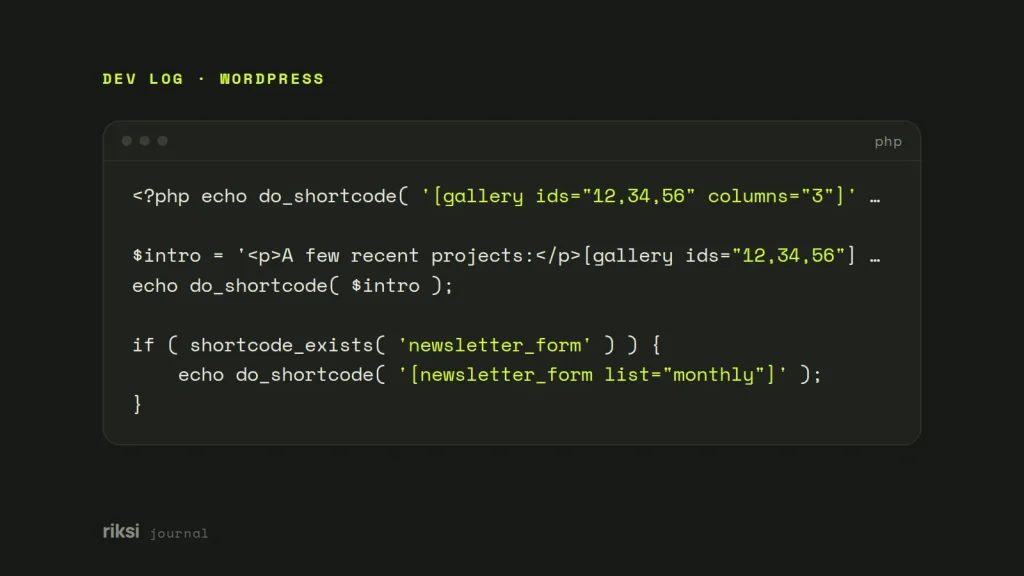
You have a shortcode that works in the editor, and now you need it inside a PHP template. Pass the shortcode text to do_shortcode() and echo what it returns. For example, echo do_shortcode( '' );. If the shortcode is your own, I’d skip the string and call the PHP function behind it. That’s easier to read and test, and you don’t have to think about quoting.
The basic call
do_shortcode() takes a string and finds every registered shortcode in it. It returns the string with each shortcode replaced by its output. It returns the result instead of printing it, so you need the echo. Yes, the echo is easy to forget. The page then shows nothing, and no error tells you why.
<?php echo do_shortcode( '' ); ?>You can pass a whole block of HTML, not only a single tag. Enclosing shortcodes like [box]...[/box] work too.
<?php
$intro = '<p>A few recent projects:</p>';
echo do_shortcode( $intro );
WordPress 5.4 added apply_shortcodes(). It’s an alias with a clearer name, and it does exactly the same thing. Use whichever name reads better to your team. I still write do_shortcode(), because it’s the name most WordPress developers recognise.
Why the shortcode prints as plain text
Sometimes [my-shortcode] shows up on the page as plain text. That means WordPress didn’t know the tag at the moment you called it. WordPress stays calm about unknown tags. It doesn’t complain. It prints them for everyone to see. These are the usual causes.
- The plugin is inactive, or it renamed its tag.
do_shortcode()leaves unknown tags as they are. Wrap the call inshortcode_exists(), so a deactivated plugin doesn’t leave brackets on the page. - You called it too early. Most plugins register their shortcodes on the
inithook. Code at the top level offunctions.php, or onplugins_loaded, runs before that. Inside a template file you’re always late enough. - It’s
</code>. WordPress handles <code></code> separately, on the <code>the_content</code> filter. <code>do_shortcode()</code> returns an empty string for it. Use <code>$GLOBALS['wp_embed']->run_shortcode( '' . $url . '' )orwp_oembed_get( $url )instead.
Here’s the shortcode_exists() check. I put it around every shortcode that comes from a plugin.
<?php
if ( shortcode_exists( 'newsletter_form' ) ) {
	echo do_shortcode( '[newsletter_form list="monthly"]' );
}
Call the function directly when you own it
do_shortcode() is made for parsing content that editors write. In a template, you already know which shortcode you want and what the attributes are. Building a string only so WordPress can parse it back into an array is a wasted step. It’s like translating an email into French, so that someone can translate it back for you. For your own shortcodes, put the real work in a normal function. Then make the shortcode a thin wrapper around it. This is how I set up every shortcode I write.
<?php
// functions.php or a small plugin.
function riksi_team_grid( int $count = 6 ): string {
	$people = get_posts( [
		'post_type'   => 'team_member',
		'numberposts' => $count,
	] );

	$html = '<ul class="team-grid">';
	foreach ( $people as $person ) {
		$html .= '<li>' . esc_html( get_the_title( $person ) ) . '</li>';
	}

	return $html . '</ul>';
}

add_shortcode( 'team_grid', function ( $atts ) {
	$atts = shortcode_atts( [ 'count' => 6 ], $atts, 'team_grid' );

	return riksi_team_grid( absint( $atts['count'] ) );
} );
Editors write [team_grid count="4"] in the content. Your template calls echo riksi_team_grid( 4 );. The output is the same, the argument has a type, and your code editor can find every place the function is used.
Core shortcodes are built the same way. 
gallery_shortcode(), and by wp_video_shortcode(). Both accept an array of attributes. For example, echo gallery_shortcode( [ 'ids' => '12,34,56', 'columns' => 3 ] );.
Some third-party shortcodes have a callback that isn’t a documented function. For those, stay with do_shortcode(). You could pull the callback out of the global $shortcode_tags array and call it yourself. I wouldn’t. It skips the pre_do_shortcode_tag and do_shortcode_tag filters, which some plugins rely on. It also breaks as soon as the plugin changes its code.
Attributes, escaping and user input
A shortcode’s output is HTML. So don’t wrap do_shortcode() in esc_html(), or you’ll print the markup as text. Visitors then see the tags themselves, which is rarely the look you wanted. Escaping is the callback’s job. Every value it puts into its output should go through esc_html(), esc_attr() or esc_url(), as in the example above.
The risky part is building the shortcode string from variables. Shortcode syntax has no reliable way to escape a quote or a square bracket. A value with " or ] ends the attribute early. A value with [ can start a different shortcode. Two rules keep you safe.
- Only insert values you have forced into a known shape. Use
absint()for IDs andsanitize_key()for slugs. - Never pass visitor input, such as query strings, form fields or comment text, to
do_shortcode(). This is the rule to be most careful with. It would let anyone run any shortcode on your site with any attributes. That includes shortcodes that show private data.
<?php
$form_id = absint( get_post_meta( get_the_ID(), 'form_id', true ) );

if ( $form_id ) {
	echo do_shortcode( '[contact_form id="' . $form_id . '"]' );
}
Write shortcodes that work in templates
A shortcode callback must return its HTML, not echo it. A callback that echoes prints wherever PHP is at that moment, usually above the rest of the content. Then do_shortcode() gets an empty string back. If you inherit a callback that echoes, catch its output with output buffering. Output buffering holds printed output in memory, so you can return it instead.
<?php
add_shortcode( 'legacy_box', function ( $atts ) {
	ob_start();
	legacy_box_output( $atts ); // Old function that prints directly.
	return ob_get_clean();
} );
When a shortcode has no attributes, $atts arrives as an empty string, not an array. shortcode_atts() handles that, which is one more reason to always use it. Pass the tag name as its third argument. Then other code can change the defaults through the shortcode_atts_{$shortcode} filter.
For third-party shortcodes in a template, do_shortcode() is fine. For your own, my advice is to call the function and skip the string. Leave the brackets to the editors, and let your templates call the function.
Comments
No comments yet. Questions, fixes and better ways are all welcome.