You run git add and Git warns that LF will be replaced by CRLF. It’s not an error. Git is converting line endings for you, and it’s harmless. The lasting fix is a .gitattributes file that sets line endings for everyone who works on the repository.
Usually core.autocrlf=true is set on Windows, and the file on disk has Unix-style LF endings. So Git will rewrite it with Windows-style CRLF endings the next time it checks the file out.
What the warning looks like
Recent versions of Git print this.
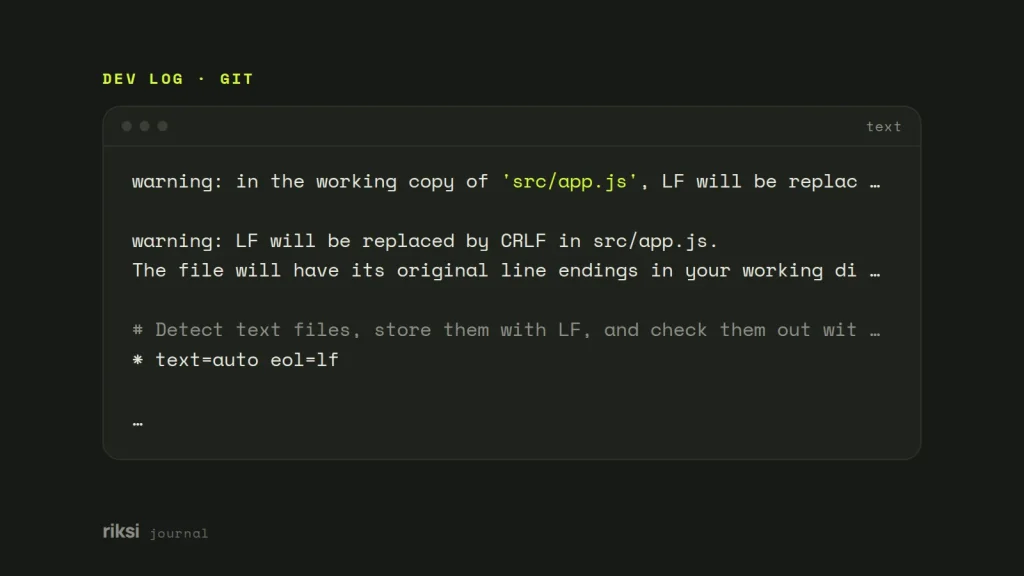
warning: in the working copy of 'src/app.js', LF will be replaced by CRLF the next time Git touches itOlder versions worded it like this.
warning: LF will be replaced by CRLF in src/app.js.
The file will have its original line endings in your working directory.
On a Mac or Linux machine with core.autocrlf=input, you may see the reverse when you add a file with Windows endings. It says “CRLF will be replaced by LF”. It does look alarming the first time you see it. It’s still only Git being helpful.
Why line endings differ
Linux and macOS end each line with a line feed (LF, \n). Windows uses a carriage return plus a line feed (CRLF, \r\n). It’s like dates in Australia and the US. Each order works at home, but a shared document gets confusing. Git can store LF in the repository and convert the endings as files go in and out.
The warning appears during git add, git diff or git status, when the file on disk does not match what Git would write.
A related sign is files that show as modified, but the diff is empty or every line has changed. That’s almost always line endings. An editor saved with different endings, or someone committed CRLF files.
Check what’s going on
I’d start with two commands. The first shows where the setting comes from. The second shows the endings of each file.
# Where is core.autocrlf set, and to what?
git config --show-origin --get core.autocrlf

# Line endings of every tracked file: in the index (i/), in your working copy (w/), and attributes
git ls-files --eol
# i/lf    w/crlf  attr/                   src/app.js
# i/crlf  w/crlf  attr/                   legacy/old.php
i/crlf means CRLF endings were committed to the repository. That’s usually what you’ll want to clean up.
On Windows, --show-origin often shows the setting comes from Git for Windows’ system config. The installer’s default option, “Checkout Windows-style, commit Unix-style line endings”, sets core.autocrlf=true. So if you never set it yourself, the installer probably did.
How core.autocrlf works
core.autocrlf is a setting on each machine. It has three values.
truechanges CRLF to LF when you commit, and LF to CRLF when you check out. Typical on Windows.inputchanges CRLF to LF when you commit, and changes nothing on checkout. Typical on macOS and Linux.falsechanges nothing either way. Files are stored exactly as they are.
git config --global core.autocrlf input   # macOS and Linux
git config --global core.autocrlf true    # Windows
A common quick fix is git config core.autocrlf false. It stops the warning, but it also stops all conversion. A Windows editor that saves CRLF now commits CRLF. The next person on a Mac then sees every line as changed. I wouldn’t use it on a shared repository. Yes, it’s tempting, because the warning goes away at once. The problem just moves to someone else’s screen.
It’s also per machine, so every new teammate has to get it right too. I prefer a .gitattributes file, because it does this job for everyone.
Fix it with a .gitattributes file
Commit a .gitattributes file to the root of the repository. Its rules travel with the code and beat everyone’s core.autocrlf for the files they match. It’s like writing the house rules on the fridge, instead of telling each guest at the door.
# Detect text files, store them with LF, and check them out with LF
* text=auto eol=lf

# Windows batch files need CRLF
*.bat text eol=crlf
*.cmd text eol=crlf

# Never convert or diff binary files
*.png binary
*.jpg binary
*.gif binary
*.woff2 binary
*.zip binarytext=autolets Git decide which files are text.eol=lfwrites LF in the working copy on every operating system.binaryis short for “not text, no diff, no merge”.
For most web projects I’d choose LF. Servers, Docker images and shell scripts all expect LF. A script saved with CRLF fails with errors like /bin/bash^M: bad interpreter.
If you want each developer to get their own platform’s endings, use plain * text=auto instead. The repository still stores LF.
Normalise an existing repository
Adding .gitattributes does not change files that are already committed. Start from a clean working tree, so commit or stash your work first. Then run this:
git add .gitattributes
git add --renormalize .
git status                       # lists the files whose endings will change
git commit -m "Normalise line endings"
Teammates pull this commit as usual, but their working copies keep the old endings until each file is rewritten. They can refresh everything at once.
Warning: reset --hard throws away local changes. Only run this when there’s nothing uncommitted.
git rm --cached -r -q .
git reset --hard
The normalisation commit touches every line of the files it changes. That clutters git blame, the command that shows who last changed each line. Add the commit’s hash to a .git-blame-ignore-revs file, then run git config blame.ignoreRevsFile .git-blame-ignore-revs, and blame will skip that commit. GitHub reads the same file.
Set up your editor too
On a new project, I add this alongside .gitattributes. An .editorconfig file with end_of_line = lf stops editors creating new CRLF files in the first place. VS Code shows the current file’s ending (LF or CRLF) in the status bar, and you can click it to switch.
After that, the repository decides the line endings, not each person’s machine.
If you only remember one thing, make it the .gitattributes file. Commit it early, and line endings stop being a team problem. After that, line endings go back to being invisible, which is all we ever wanted from them.
Comments
No comments yet. Questions, fixes and better ways are all welcome.