Dev log 23 DevSEO & AI search
How AI search finds your site: crawlers, robots.txt and llms.txt
You want your site to show up when someone asks ChatGPT or Perplexity a question. It starts with access. AI search tools only cite pages their crawlers can reach. A crawler is a bot that fetches web pages. If it can’t get to your site, or your page is hard to understand, you won’t be in the answer.
ChatGPT, Claude, Perplexity and Google’s AI Overviews and AI Mode all work this way. Below I cover which bots are involved, how to let the right ones in, and what helps once they arrive.
What kinds of AI crawler are there?
The big AI companies now run separate bots for separate jobs. That’s good news, because it means you can choose.
- Search crawlers index pages so AI search answers can find and cite them.
- Training crawlers collect content that may be used to train future models.
- User fetchers visit a page because someone just asked the assistant about it.
| Company | User agent | What it is for |
|---|---|---|
Googlebot |
Google Search, including AI Overviews and AI Mode. | |
Google-Extended |
Not a separate crawler. It’s a robots.txt token that controls whether your content helps Gemini apps and Vertex AI. It doesn’t affect Search. | |
| OpenAI | OAI-SearchBot |
Showing sites in ChatGPT search. |
| OpenAI | GPTBot |
Content that may be used to train models. |
| OpenAI | ChatGPT-User |
Pages a user asks ChatGPT to visit. |
| Anthropic | Claude-SearchBot |
Improving Claude’s search results. |
| Anthropic | ClaudeBot |
Content that may be used for training. |
| Anthropic | Claude-User |
Pages fetched to answer a user’s question. |
| Perplexity | PerplexityBot |
Indexing for Perplexity search results. |
| Perplexity | Perplexity-User |
Pages fetched for a user’s query. |
The search and training crawlers follow robots.txt. The user fetchers are less clear. OpenAI says robots.txt rules may not apply to ChatGPT-User. Perplexity says Perplexity-User generally ignores them, because a person asked for the page. Anthropic says all three of its bots respect robots.txt. So I’d plan as if a user fetcher may not read your rules at all. robots.txt is a polite sign on the door, not a lock.
A robots.txt that lets AI search in
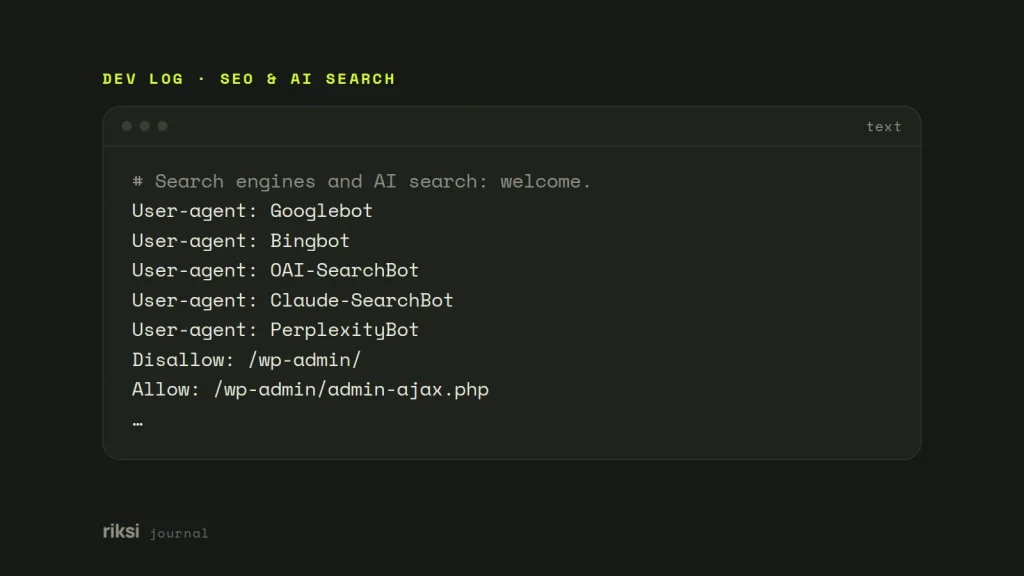
robots.txt is a plain text file at the root of your site. It tells bots which parts they may visit. For most businesses, I’d let every search crawler in and make a clear choice about training. The file below does that, and it opts out of training.
# Search engines and AI search: welcome.
User-agent: Googlebot
User-agent: Bingbot
User-agent: OAI-SearchBot
User-agent: Claude-SearchBot
User-agent: PerplexityBot
Disallow: /wp-admin/
Allow: /wp-admin/admin-ajax.php

# Model training: your call. These lines opt out.
User-agent: GPTBot
User-agent: ClaudeBot
User-agent: Google-Extended
Disallow: /

# Everyone else.
User-agent: *
Disallow: /wp-admin/
Allow: /wp-admin/admin-ajax.php

Sitemap: https://example.com/wp-sitemap.xml
One detail often confuses people, so I’ll say it plainly. A crawler obeys only the group that names it. Once it finds its own group, it ignores the User-agent: * group. That’s why the /wp-admin/ rule appears twice. If you give a bot its own group, repeat any rules you still want it to follow.
If you’re happy for your content to be used in training, leave out the middle group. There’s no right answer here. But it should be a choice you make, not an accident.
In WordPress
WordPress builds robots.txt when someone asks for it, so there’s usually no file to edit. It’s a file that only exists while someone is reading it. Add your rules with the robots_txt filter, in your theme or a small plugin. I prefer a small plugin, so the rules stay in place if you ever switch themes.
add_filter( 'robots_txt', function ( $output, $public ) {
	if ( ! $public ) {
		return $output; // "Discourage search engines" is on; leave it alone.
	}
	return $output . "nUser-agent: GPTBotnUser-agent: ClaudeBotnUser-agent: Google-ExtendednDisallow: /n";
}, 10, 2 );
Check nothing else is blocking them
robots.txt is only half of it. Firewalls, security plugins and CDNs can block bots before they ever read it. A CDN (content delivery network) serves your site from servers around the world. Some hosts now offer a one-click “block AI bots” setting. A setting like that can also block the search crawlers you want. It’s easy to switch on, and just as easy to forget about.
Here’s a quick first check from the terminal.
curl -sI -A "OAI-SearchBot" https://example.com/ | head -n 1
curl -sI -A "Claude-SearchBot" https://example.com/ | head -n 1
A 200 is what you want. A 403 means something in front of the site is turning that user agent away. This only tests your own setup. Real crawlers come from their own networks, so treat it as a quick first test, not proof.
Then make the page explain itself
Getting crawled is only the first step. Being quoted depends on whether the page is easy to understand and trust. I’d start with the first point in this list, because it helps readers as much as bots.
- Answer first. Put the direct answer near the top of the page or section, then the detail. Passages that answer a question plainly are the ones that get quoted.
- Use real structure. That means one H1, sensible H2s and H3s, and lists and tables where they fit. The same structure helps screen readers.
- Add structured data. Schema.org markup for the organisation, the author, articles, products and FAQs tells machines what the page is. It also tells them who is behind it.
- Say who and when. Show a named author with real experience, a publish date and an updated date. Anonymous, undated pages are harder to trust.
- Keep it fast and open. Pages should render without waiting on JavaScript. They should load quickly and not hide behind pop-ups.
Google is very direct about this. There are no extra requirements for AI Overviews or AI Mode. A page has to be indexed and able to show in Search with a snippet. The normal SEO basics do the rest. So the newest part of Google Search runs on some of the oldest advice in SEO.
Do you need llms.txt?
llms.txt is a proposed file at the root of a site. It gives language models a short, plain-text summary and a list of the important pages. It’s a proposal, not a standard. Google has said you don’t need new machine-readable files or “AI text files” to appear in its AI features.
I still add one to the sites I build. It takes minutes, you can generate it from content you already have, and some tools do read it. What I won’t do is sell it as a ranking trick. A site that is crawlable, fast and well structured matters far more. A menu in the window helps, but people come back for the food.
Measure it
Google counts clicks and impressions from AI Overviews and AI Mode in the normal Search Console performance report. For the other assistants, look at referrals in your analytics. Visits from chatgpt.com, perplexity.ai and claude.ai show up as referral traffic. The numbers are often small, but they show you which pages are being cited.
Your next step is to open your own robots.txt and see which bots it names. After that, I’d spend your time on clear, well-structured pages, not on tricks. Once the bots can get in, give them something worth quoting.
Comments
No comments yet. Questions, fixes and better ways are all welcome.