Dev log 26 DevPerformance
Core Web Vitals in plain English: LCP, INP and CLS
Your PageSpeed report shows three scores, and you’re not sure what they mean. Core Web Vitals are Google’s three measures of how a page feels to use. They’re measured on real visitors and feed into Google’s ranking systems. More importantly, they match whether people stay.
- LCP (Largest Contentful Paint) is how fast the main content appears. Good is 2.5 s or less, poor is over 4 s.
- INP (Interaction to Next Paint) is how fast the page responds when you tap or type. Good is 200 ms or less, poor is over 500 ms.
- CLS (Cumulative Layout Shift) is whether things jump around while it loads. Good is 0.1 or less, poor is over 0.25.
A page passes when at least 75 per cent of real visits meet the “good” threshold. Mobile and desktop are measured separately. That 75th percentile matters. A fast result on your office fibre says little about a visitor on a mid-range phone. That’s why I’d test on a mid-range phone too, not only on a laptop.
LCP: when the main content appears
Largest Contentful Paint is the moment the biggest image or block of text on the screen finishes rendering. On most pages that’s the hero image or the main heading. Slow LCP almost always has one of four causes. The server is slow, the image is too large, the browser finds the image late, or CSS and JavaScript block rendering.
- Serve the right image. Use a modern format (WebP or AVIF), sized for the screen with
srcset.wp_get_attachment_image()writes thesrcsetfor you. - Don’t lazy-load it. Lazy-loading waits until you scroll near an image, so it suits images further down the page. The LCP image should load straight away, and it helps to mark it as important. Lazy-loading is a speed feature, but it makes this one image slower.
- Fix the server. Page caching and good hosting bring down the time to first byte, and everything else waits on that.
I’d look at the image first, because it’s the easiest of the four to fix.
<img src="hero-1200.webp"
     srcset="hero-800.webp 800w, hero-1200.webp 1200w, hero-1800.webp 1800w"
     sizes="100vw" width="1200" height="800"
     fetchpriority="high" alt="...">
Recent versions of WordPress already add fetchpriority="high" to the image they expect to be the LCP. They also skip lazy-loading for images near the top. Check that your theme isn’t undoing that.
INP: how fast the page responds
Interaction to Next Paint replaced First Input Delay (FID) as a Core Web Vital in March 2024. FID only timed the first interaction. INP looks at the clicks, taps and key presses across the whole visit, and reports one of the slowest. It measures the time from the interaction until the browser can paint the result.
Poor INP means the browser’s main thread is busy. The main thread is like a shop with one cashier. While it serves one long task, everyone else waits in the queue. Usually there is too much JavaScript running at once, often from third-party scripts, sliders, page builders and tag managers.
- Ship less JavaScript. Remove plugins and scripts you don’t need. Load the rest with
defer, so they don’t block the page. - Break up long tasks. Work that takes more than about 50 milliseconds blocks input. Split it, so the browser can respond in between.
- Check your third-party scripts. Chat widgets, heatmaps and ad scripts are common causes. Load them late, or only on the pages that need them.
I’d remove scripts before trying to speed them up. A script you don’t load can’t block anything.
// Let the browser handle input between chunks of work.
async function processAll(items) {
  for (const item of items) {
    process(item);
    await new Promise((resolve) => setTimeout(resolve, 0));
  }
}
CLS: whether things jump around
Cumulative Layout Shift adds up how much visible content moves unexpectedly while the page is open. Think of a button that moves just as you tap it, or text that drops when an image loads above it. Of the three, I find CLS the easiest to fix. The browser can’t save space for an image when nobody has told it the size.
- Give images and embeds their size.
widthandheightattributes, or a CSSaspect-ratio, let the browser keep the space free before the file arrives. - Keep space for late content. Banners, ads and cookie notices need room kept for them, or they should sit over the page instead of pushing it down.
- Control web fonts. Preload the main font and use
font-display: swapwith a fallback font of similar size. Then the text doesn’t move much when the font arrives.
How to measure
There are two kinds of data. Field data comes from real Chrome users over the previous 28 days, and it’s what Google uses. Lab data is one simulated page load. It helps you find causes, but it isn’t the score that counts. Yes, that means a perfect lab score can sit next to a failing field score. Both are telling the truth. I look at field data first and use lab data to find the cause.
- PageSpeed Insights shows both for any URL, with field data first.
- Search Console has a Core Web Vitals report that groups your pages by status.
- The Performance panel in Chrome DevTools shows live LCP, INP and CLS as you use the page.
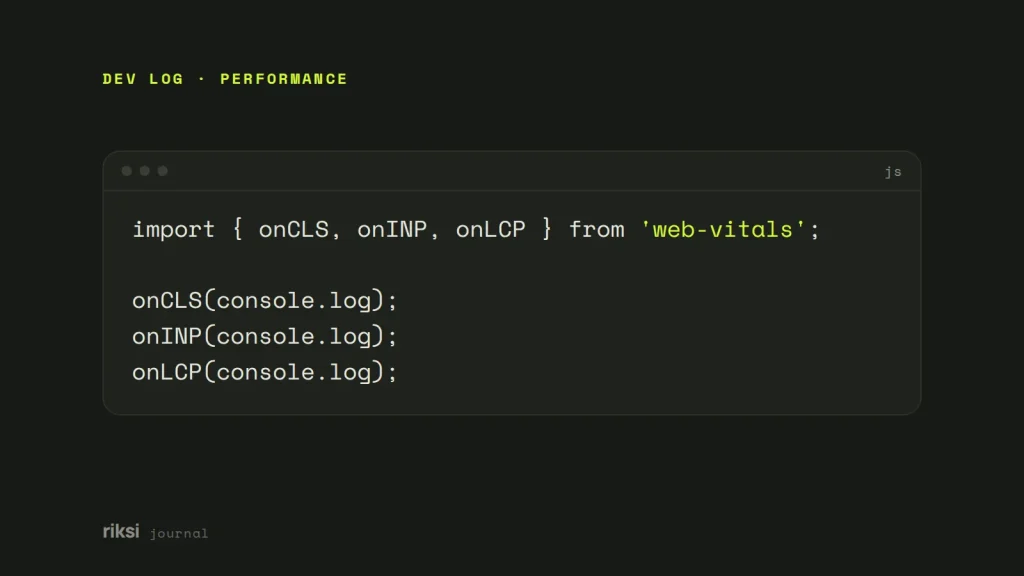
- Google’s small
web-vitalslibrary reports your own visitors’ real numbers, which you can send to your analytics.
import { onCLS, onINP, onLCP } from 'web-vitals';

onCLS(console.log);
onINP(console.log);
onLCP(console.log);
How much do they matter for SEO?
Google uses Core Web Vitals in its ranking systems. But relevance and useful content still come first. Good vitals are like a tidy shop front. They help, but people come in for what’s on the shelves. A fast page that doesn’t answer the question won’t outrank a slower page that does. I treat good vitals as the minimum. The bigger win is that faster, steadier pages keep more of the visitors you already have.
Where to start
Before you change anything, check your field data in PageSpeed Insights or Search Console. Then fix the worst metric first. After a change, measure again in 28 days, because field data takes that long to catch up. Twenty-eight days is a long wait. Field data counts real visits, and they take time to arrive.
If you only remember one thing, make it the field data. That’s the number your visitors feel.
Comments
No comments yet. Questions, fixes and better ways are all welcome.