Lesson 16 LearningExplainers
Cookie consent: a plain guide for every site
Cookie banners confuse almost everyone, so let me clear it up. The single rule that explains the whole mess is this: the law follows your visitor, not your business. Where your server sits barely matters. What matters is where the person looking at your site is sitting. Get that, and the rest falls into place. This guide covers who needs a banner and the rules in each region. It also covers the must-keep cookies, how to handle Google Analytics and pixels, and what a good banner looks like.
I’ve written it for shop owners and developers both. Keep it as a reference. First, a two-second question to find your situation.
<div class="pick">
  <p class="pick__q">Where are most of your visitors?</p>
  <div class="pick__opts">
    <label><input type="radio" name="reg" id="r1" checked><span>Europe or the UK</span></label>
    <label><input type="radio" name="reg" id="r2"><span>The United States</span></label>
    <label><input type="radio" name="reg" id="r3"><span>Australia only</span></label>
    <label><input type="radio" name="reg" id="r4"><span>A mix, or I sell worldwide</span></label>
  </div>
  <div class="ans ans--eu">
    <p class="ans__name">Full opt-in banner</p>
    <p class="ans__why">Ask before any non-essential cookie loads. Accept, Reject and Manage, all equally easy. Block analytics and ad scripts until consent, and add Google Consent Mode if you use Google.</p>
    <p class="ans__tag">Style: opt-in</p>
  </div>
  <div class="ans ans--us">
    <p class="ans__name">Notice plus an opt-out</p>
    <p class="ans__why">You can track by default, but show a clear notice and a "Do not sell or share my info" choice. Honour the Global Privacy Control browser signal.</p>
    <p class="ans__tag">Style: opt-out</p>
  </div>
  <div class="ans ans--au">
    <p class="ans__name">A clear notice and privacy policy</p>
    <p class="ans__why">No European-style banner is required yet. Disclose your tracking, keep a good privacy policy, and let people opt out of analytics. Add a full banner the moment you get overseas visitors.</p>
    <p class="ans__tag">Style: notice</p>
  </div>
  <div class="ans ans--mix">
    <p class="ans__name">A location-aware banner</p>
    <p class="ans__why">Show each visitor the right version: opt-in for Europe and the UK, opt-out for the US, a notice for everyone else. This is what most shops need.</p>
    <p class="ans__tag">Style: geo-targeted</p>
  </div>
</div>
.pick{font-family:"DM Sans",system-ui,sans-serif;color:#171915;background:#F4F4F4;border:1px solid #D7D7D7;border-radius:16px;padding:22px;max-width:580px;margin:0 auto}
.pick__q{font-family:Manrope,system-ui,sans-serif;font-weight:800;font-size:17px;margin:0 0 14px}
.pick__opts{display:flex;flex-direction:column;gap:10px;margin-bottom:18px}
.pick label{display:flex;align-items:center;gap:11px;background:#fff;border:1px solid #D7D7D7;border-radius:11px;padding:12px 14px;cursor:pointer;font-size:15px;transition:border-color .15s,box-shadow .15s}
.pick label:hover{border-color:#171915}
.pick input{appearance:none;-webkit-appearance:none;width:20px;height:20px;border:2px solid #9a9b94;border-radius:50%;flex:0 0 auto;margin:0;cursor:pointer;transition:border-color .15s}
.pick input:checked{border-color:#171915;background:radial-gradient(circle,#FFD400 0 6px,#fff 6px 8px,#FFD400 8px)}
.pick label:has(input:checked){border-color:#171915;box-shadow:0 0 0 2px #FFD400}
.ans{display:none;background:#fff;border:1px solid #D7D7D7;border-left:5px solid #FFD400;border-radius:12px;padding:16px 18px}
.ans__name{font-family:Manrope,sans-serif;font-weight:800;font-size:19px;margin:0 0 6px}
.ans__why{margin:0 0 8px;font-size:15px;line-height:1.5;color:#2b2d27}
.ans__tag{margin:0;font-family:"Space Mono",monospace;font-size:13px;color:#5C5E57}
.pick:has(#r1:checked) .ans--eu{display:block}
.pick:has(#r2:checked) .ans--us{display:block}
.pick:has(#r3:checked) .ans--au{display:block}
.pick:has(#r4:checked) .ans--mix{display:block}The rules, region by region
There is no single global cookie law. There are a few big ones, and they take different shapes. Here is each one in plain terms.
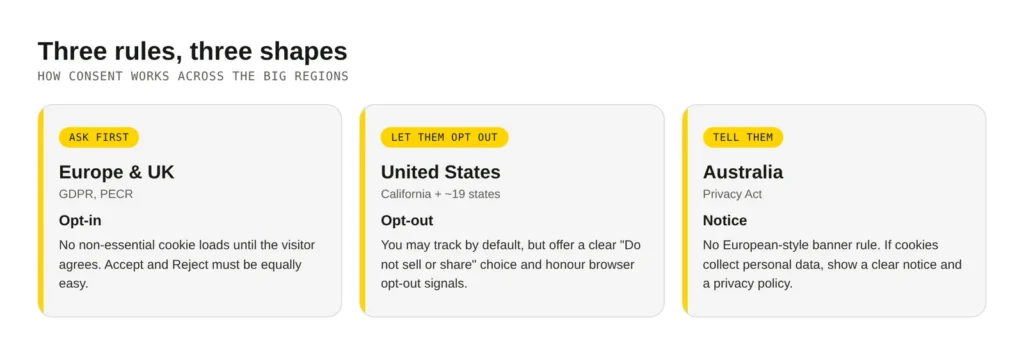
- Europe and the UK: ask first. Under the GDPR and the UK’s PECR rules, you need opt-in consent before any non-essential cookie loads. No pre-ticked boxes. No “by using this site you agree”. Accept and Reject must be equally easy.
- United States: let people opt out. There’s no federal law, but around 19 states now have privacy laws, led by California. The model is the reverse of Europe. You may track by default. But you must offer a clear “Do not sell or share my info” choice, and honour browser signals like Global Privacy Control.
- Australia: tell people clearly. The Privacy Act has no European-style banner rule. If your cookies collect personal data, you need a clear privacy policy and a notice. Many small businesses are exempt for now, though that is under review. I’d still disclose your tracking and let people opt out of it.
Here’s the part that trips up Australian shops. Say you run a store in Melbourne, and someone in London buys from you. If you ship to the UK or market there, UK rules apply to that visitor, no matter where you are. The law reached across the world and followed them home. The clean fix is a banner that changes by location: the full opt-in version for UK and European visitors, a lighter notice for everyone else.
The cookies you can never switch off
Some cookies are the glue holding your site together. These are called strictly necessary, and the good news is they need no consent at all. Block them and the shopping cart falls through the floor.
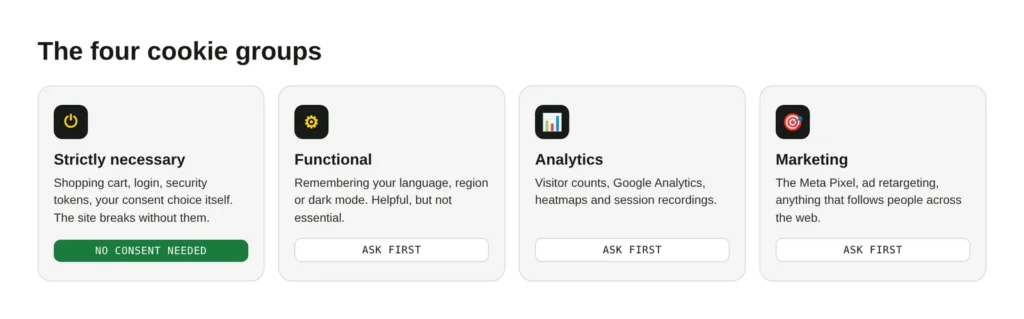
The test is simple: would the site break for something the visitor asked for? If yes, it’s strictly necessary. If the site works fine without it, it needs consent. Here’s how the four groups line up:
- Strictly necessary (always on). The shopping cart, login sessions, security tokens, and the cookie that remembers your consent choice itself. No consent needed, but you still list them.
- Functional. Remembering your language, region or dark mode. Low risk, but outside Europe’s “necessary” line, so ask.
- Analytics. Google Analytics, heatmaps, visitor counts. Need consent in Europe and the UK.
- Marketing. The Meta Pixel, ad retargeting, anything that follows people around the web. Always needs consent.
Analytics, Hotjar and the Meta Pixel: what to do
This is where most sites break the rules without meaning to. The trap is that these scripts load the moment the page opens, setting cookies before anyone has agreed to anything. For a European or UK visitor, that’s already too late.
The rule is block first, load on consent. A good consent tool holds these scripts back until the visitor says yes, then lets them run. By hand, you wrap each script so it only fires after consent, instead of dropping it straight in the page:
<!-- Wrong: this runs before anyone agrees -->
<script src="https://example-analytics.com/track.js"></script>

<!-- Better: let your consent tool decide when it loads -->
<script type="text/plain" data-category="analytics"
        src="https://example-analytics.com/track.js"></script>
If you run Google Analytics or Google Ads for European or UK visitors, there’s an extra step called Google Consent Mode. It passes the visitor’s yes or no to Google, so the tags know how to behave. Since March 2024 Google has required it for ads and measurement in those regions. You don’t code it from scratch. A good consent plugin sends the four signals Google expects, and most let you switch it on with a tick. My advice is to use a tool that does this for you. The order of those signals matters, and it’s fiddly to get right by hand.
The same block-first rule covers Hotjar, Microsoft Clarity, the Meta Pixel, TikTok, embedded YouTube videos and live chat widgets. A quick reminder from my heatmaps guide: any tool that watches your visitors is a tool you must declare.
Accept, Reject, Manage: what a good banner looks like
Here’s the question I get most: can I just show one “OK” button and move on? In Europe and the UK, no. A banner that only lets people agree is like a door marked “exit” that only opens inward. Saying no has to be as easy as saying yes.
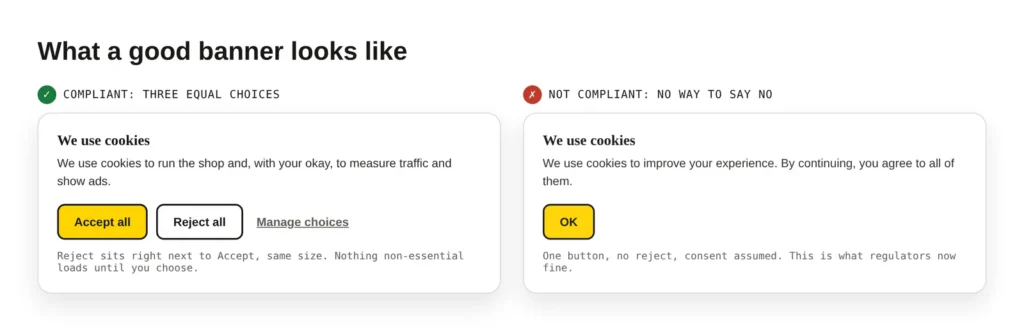
A banner that keeps you safe has three clear choices, and treats them as equals:
- Accept all. One tap to agree to everything.
- Reject all. Same size, same prominence, right next to Accept. Hiding it in a corner is exactly what regulators now fine people for.
- Manage choices. A link to turn categories on and off, for people who want the detail.
So which style suits your site? It comes down to who visits:
- Selling to Europe or the UK: the full three-button banner, with scripts blocked until consent. No shortcuts.
- Selling to the US: a notice plus a “Do not sell or share my info” opt-out, and honour the Global Privacy Control signal.
- Australia only, small shop: a plain, honest notice and a good privacy policy. A banner isn’t strictly required, but it’s wise the moment you get overseas visitors.
- Selling worldwide: a location-aware banner that shows each visitor the right version. This is what most shops need.
Set it up without the headache
You don’t need to build any of this yourself. The tools below scan your site, sort cookies into categories, block the risky scripts until consent, and change the banner by country.
- On WordPress: Complianz and CookieYes are the popular picks. Both have a free tier, auto script-blocking and Google Consent Mode built in. Install, run the wizard, and answer its questions truthfully.
- On Shopify: there’s a built-in consent banner in your settings, powered by Shopify’s privacy tools. It’s a solid start. For auto-blocking and finer control, add a dedicated app.
Whatever you pick, test it yourself. Open your site in a private window, reject everything, and check that no analytics or ad cookies appear. Then do the same for accept. One honest warning to finish on: I’m a developer, not a lawyer, and this is general guidance, not legal advice. For anything high-stakes, check with a privacy adviser. If you’d like us to set up a location-aware banner and wire your tracking up the right way, our site updates service covers it.
Opens in a new tab


Comments
No comments yet. Questions, fixes and better ways are all welcome.