Dev log 03 DevJavaScript
Replace text in a string with JavaScript
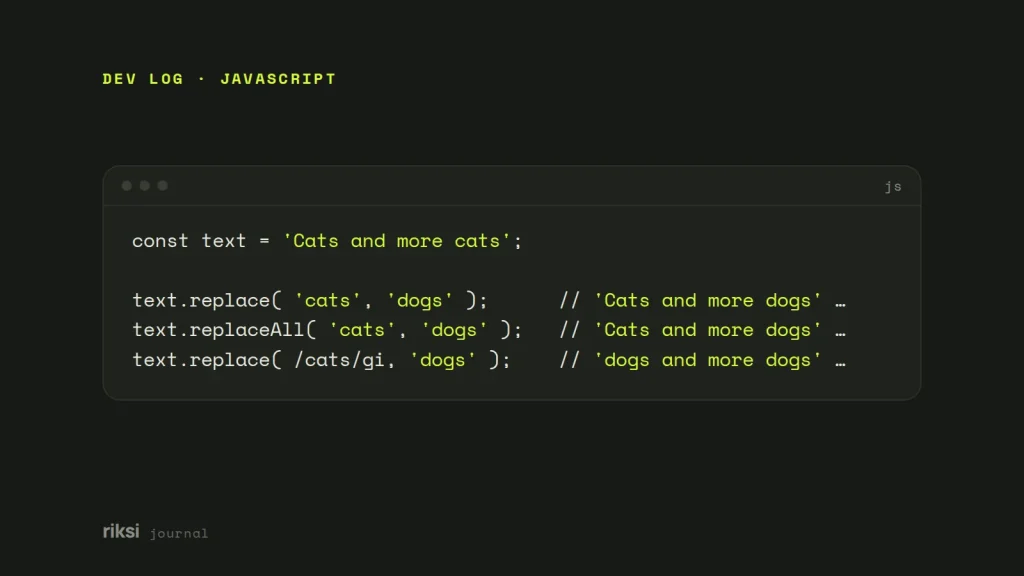
You call replace on a string and only the first match changes. Here’s the fix. Use str.replace( 'old', 'new' ) to change the first match. Use str.replaceAll( 'old', 'new' ) to change every match. For patterns or case-insensitive matching, pass a regular expression, like str.replace( /old/gi, 'new' ).
JavaScript strings can’t be changed in place. So both methods return a new string and leave the original alone.
const text = 'Cats and more cats';

text.replace( 'cats', 'dogs' );      // 'Cats and more dogs'   first exact match only
text.replaceAll( 'cats', 'dogs' );   // 'Cats and more dogs'   every exact match
text.replace( /cats/gi, 'dogs' );    // 'dogs and more dogs'   every match, any case
replace() with a string
With a plain string as the first argument, replace() swaps only the first occurrence. It doesn’t tell you it skipped the rest, either. The match is also case-sensitive. This often surprises people when the same word appears twice. And remember to keep the result.
let title = 'Hello world';
title.replace( 'world', 'there' );         // does nothing to title on its own
title = title.replace( 'world', 'there' ); // 'Hello there'
replaceAll() does what the name says
replaceAll() arrived in ES2021. Every current browser and Node.js support it. With a string, it replaces every occurrence, which is what most people expect replace() to do. For plain text, I prefer it, because it reads the way it works. If you pass it a regular expression, the regex must have the g flag. Otherwise it throws a TypeError.
'a-b-c'.replaceAll( '-', ' ' );   // 'a b c'
'a-b-c'.replaceAll( /-/g, ' ' );  // 'a b c'
'a-b-c'.replaceAll( /-/, ' ' );   // TypeError: replaceAll must be called with a global RegExp
Regular expressions and flags
A regular expression (regex) is a pattern for matching text. Flags go after the closing slash and change how it matches. They work like the tick boxes next to a search field in a text editor.
| Flag | Effect |
|---|---|
g |
Global. Every match, not just the first. |
i |
Ignore case. |
m |
Multiline. ^ and $ match at line breaks. |
u |
Full Unicode matching, needed for emoji and some scripts. |
'  lots   of   spaces  '.replace( /\s+/g, ' ' ).trim();  // 'lots of spaces'
'2026-09-25'.replace( /(\d+)-(\d+)-(\d+)/, '$3/$2/$1' ); // '25/09/2026'
Special patterns in the replacement
The replacement string isn’t quite literal. $& inserts the whole match. $1 to $9 insert captured groups. $$ inserts a single dollar sign. That matters when the replacement is a price. Yes, you type two dollar signs to get one. It looks like a typo, but it is correct.
'Price: X'.replace( 'X', '$5' );    // 'Price: $5'
'Price: X'.replace( 'X', '$&5' );   // 'Price: X5'   ($& means "the match")
'Price: X'.replace( 'X', '$$5' );   // 'Price: $5'
Use a function as the replacement
Pass a function to decide each replacement in code. It receives the match and any captured groups. I find this easier to read than a replacement string full of $ patterns. A replacement string is like a template letter with blanks. A function writes a fresh reply for every match.
const prices = 'Tea 4, Cake 6';
prices.replace( /\d+/g, ( n ) => ( n * 1.1 ).toFixed( 2 ) );   // 'Tea 4.40, Cake 6.60'

'hello world'.replace( /\b\w/g, ( c ) => c.toUpperCase() );    // 'Hello World'
A function also avoids the $ patterns completely, because its return value is used as it is.
Replace text a user typed
The text to find may come from a user. If so, don’t drop it into new RegExp() as it is. Characters such as ., *, ( and ? have special meanings. They will match the wrong things or throw an error. To a regex, a dot in the search text means any character. The person who typed it most likely meant a dot.
I’d use replaceAll() with the plain string, which treats it literally. If you need a regex, escape it first.
const escapeRegExp = ( s ) => s.replace( /[.*+?^${}()|[\]\\]/g, '\\$&' );

const find = 'price (AUD)';
const re = new RegExp( escapeRegExp( find ), 'gi' );
'Price (aud) and PRICE (AUD)'.replace( re, 'cost' );   // 'cost and cost'
Newer engines add RegExp.escape() for this. Until it works everywhere you need it, the small function above does the same job.
Replace text on the page
To change text in the document, replace inside textContent, not innerHTML. Rewriting innerHTML parses the markup again and drops event listeners. It can also inject HTML if the replacement came from a user.
const el = document.querySelector( '.notice' );
el.textContent = el.textContent.replaceAll( 'Sydney', 'Melbourne' );
Always assign the result of replace() or replaceAll(). The original string never changes, however many times you ask.
Comments
No comments yet. Questions, fixes and better ways are all welcome.