Locked out of WordPress or Magento, but you can still reach the database? Then you can set a new password by writing its hash into the user’s row. A hash is the scrambled form of the password that the site stores. The generator below makes the formats each system accepts.
For WordPress, even a plain MD5 hash works once. WordPress upgrades it to a strong hash when you log in.
The form sends your password over HTTPS in the body of the request, not in the address. Nothing you type is stored or logged. Even so, I’d only make a hash for a temporary password. Change it from the dashboard as soon as you log in.
Which hash does WordPress use?
- WordPress 6.8 and later uses bcrypt, with the password pre-hashed (
$wp$2y$10$…). - WordPress 3.0 to 6.7 uses the phpass portable hash (
$P$B…). - Any version accepts plain MD5 as a fallback (32 hex characters).
If you’re not sure which version you run, I list six ways to find the WordPress version.
WordPress has used three password formats over the years, and it still accepts all of them. WordPress 6.8 switched to bcrypt in April 2025. Older $P$ hashes keep working and are upgraded at the next login. Plain MD5 is still accepted for exactly this locked-out case, and WordPress replaces it with bcrypt when you log in. So if you only have phpMyAdmin, I’d go with MD5, as long as you log in immediately.
Set a WordPress password in the database
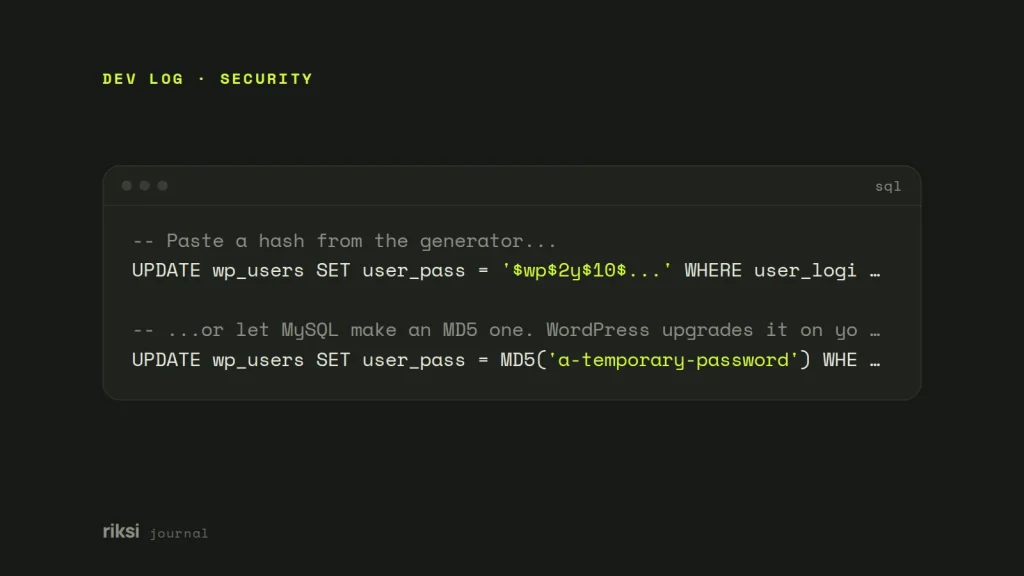
In phpMyAdmin or Adminer, open the wp_users table. Your table prefix may be different. Edit the user and paste the hash into user_pass. Or run SQL:
-- Paste a hash from the generator...
UPDATE wp_users SET user_pass = '$wp$2y$10$...' WHERE user_login = 'admin';

-- ...or let MySQL make an MD5 one. WordPress upgrades it on your next login.
UPDATE wp_users SET user_pass = MD5('a-temporary-password') WHERE user_login = 'admin';
Log in straight away and change the password in Users → Profile. Until you log in, an MD5 hash is weak. Anyone who copies the database could crack a simple password in seconds.
A better way with WP-CLI
With SSH access you don’t need a hash at all, and it’s the way I prefer. Yes, that means you can skip the generator on this page. I’m fine with that. WP-CLI is the WordPress command line tool. It sets the password properly, in the current format:
wp user list --fields=ID,user_login,user_email
wp user update admin --user_pass='a-long-new-password'
In PHP, you can do the same with wp_set_password( $password, $user_id ). It also clears the user’s sessions.
Magento password hashes
Magento stores passwords as hash:salt:version. A salt is a random string added to the password before hashing. In Magento 2 (Adobe Commerce), the version number says which algorithm made the hash. It works like a label on a jar, telling Magento how the contents were made.
0is MD5, a legacy format from Magento 1 imports.1is SHA-256, the default when PHP has no Sodium extension.2is Argon2id, the default on modern PHP.
Magento 2 accepts the older versions and upgrades them over time. So a SHA-256 hash from the generator works for resetting an admin password. The generator hashes the salt, then the password, together.
UPDATE admin_user
SET password = CONCAT(SHA2(CONCAT('RandomSalt32chars', 'a-temporary-password'), 256), ':RandomSalt32chars:1')
WHERE username = 'admin';
Magento 1 used md5(salt + password):salt without a version. That’s the “Magento 1” line in the generator.
A better way with bin/magento
I’d create a new admin user from the command line instead.
# Create a new admin user (then delete or fix the old one in the admin)
bin/magento admin:user:create --admin-user='newadmin' --admin-password='a-long-new-password' \
  --admin-email='[email protected]' --admin-firstname='Your' --admin-lastname='Name'

# Unlock an admin locked out by too many failed attempts
bin/magento admin:user:unlock admin
Why MD5 and SHA-1 are not safe for storing passwords
MD5 and SHA-1 were designed to be fast, and that’s exactly wrong for passwords. A single graphics card can try billions of guesses a second, so common passwords fall almost instantly. Modern password hashes like bcrypt and Argon2 are slow on purpose, and salted, so each guess costs real time. This is one of the few places in programming where slow code is the goal.
That’s why WordPress only uses MD5 as a one-time way back in. In your own PHP code, my advice is to always use password_hash() and password_verify(). Never use md5() or sha1().
$hash = password_hash( $password, PASSWORD_DEFAULT ); // bcrypt today, stronger later
if ( password_verify( $attempt, $hash ) ) {
	// correct password
}
If you have SSH, I’d use the command line and skip the hash. With only the database, paste a hash into user_pass for WordPress, or password in admin_user for Magento. Then log in and change it straight away.
Comments
No comments yet. Questions, fixes and better ways are all welcome.