Trick 04 Tricks & hacksTerminal
How to kill a process using a TCP port on Mac
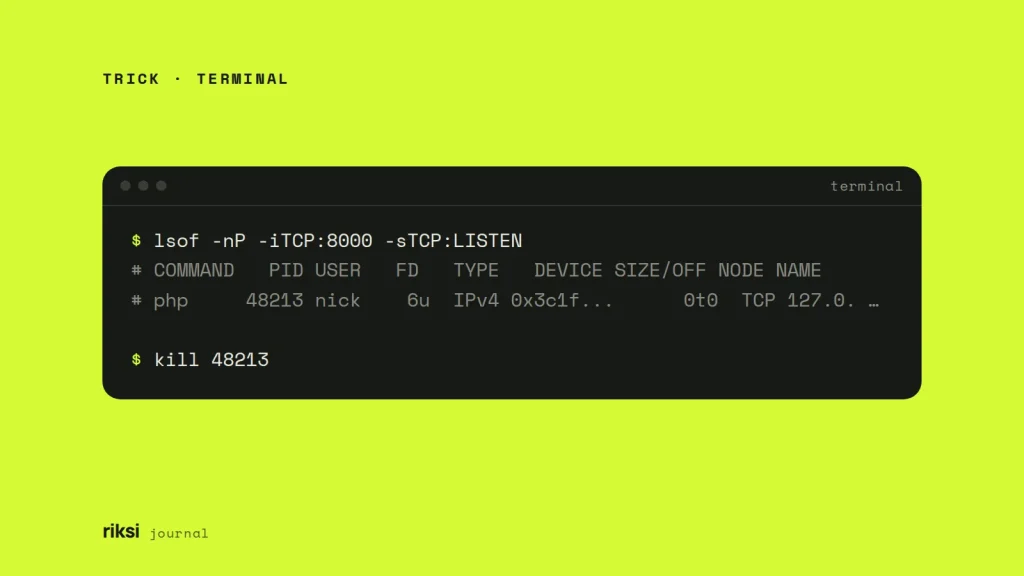
You start your dev server and it says the port is already in use. Something else is holding it. To free a TCP port on a Mac, find the process listening on it with lsof -nP -iTCP:8000 -sTCP:LISTEN. Then stop it with kill and the PID (process ID) from the output. I only reach for kill -9 if the process ignores a normal kill.
lsof -nP -iTCP:8000 -sTCP:LISTEN
# COMMAND   PID USER   FD   TYPE   DEVICE SIZE/OFF NODE NAME
# php     48213 nick    6u  IPv4 0x3c1f...      0t0  TCP 127.0.0.1:8000 (LISTEN)

kill 48213
This fixes “Address already in use” and “port 8000 is already in use”. You see these errors when you start php artisan serve, a Vite or Next.js dev server, or anything else that listens locally.
What the lsof flags do
-iTCP:8000lists network connections on TCP port 8000.-sTCP:LISTENkeeps only the socket that is listening. A plainlsof -i :8000also lists every browser tab connected to your dev server. If you kill those PIDs, you close your browser, not the server. The browser was only visiting. That’s why I always add this flag.-nand-Pskip hostname and port-name lookups. The output is faster and shows plain numbers.-t(used below) prints only the PIDs, which is handy for scripts.
On macOS, lsof only shows your own processes. If it prints nothing but the port’s still busy, run it with sudo. The port belongs to a process owned by root or another user, such as a service started with sudo.
Stop it gently first
I always start here. Plain kill PID sends SIGTERM, a signal that asks the process to shut down. A well-behaved server finishes its current requests, flushes its logs and removes its lock or PID files. It’s like telling a shop it’s closing time. The staff still get to serve the last customers and lock up. Wait a second, then run the lsof command again to check the port is free.
If the process is still there, send the stronger signal.
kill -9 48213kill -9 sends SIGKILL, which the process can’t catch or ignore. It gets no chance to clean up. That can leave old PID files, half-written files, or a database that needs recovery when it next starts.
I wouldn’t use kill -9 on a database. For databases and other long-running services, use the service’s own stop command instead, for example brew services stop mysql.
Once you know what’s on the port, you can find and stop it in one line. Check the output of the lsof command first, so you know what you’re about to stop.
kill $(lsof -tiTCP:8000 -sTCP:LISTEN)Who took the port, and why
Killing the process fixes the symptom. If you know why the port was busy, you won’t have to do this again tomorrow. These are the usual causes.
- It’s still running in another tab. An old terminal tab, or the terminal panel in your editor, still has the server running. Switch to it and press Ctrl+C.
- It was suspended, not stopped. Ctrl+Z pauses a process (zsh prints “suspended”), but the process keeps the port. Run
jobsto see it. Then runfgto bring it back and press Ctrl+C, or runkill %1. - A Docker container publishes the port. The command name in
lsofstarts withcom.docker. Don’t kill Docker itself. Find the container withdocker ps --filter publish=8000and rundocker stopon it. - A background service restarts it. Services managed by
launchd, including ones started withbrew services, can come straight back after a kill. Checkbrew services listand stop the service properly. - macOS is using port 5000 or 7000. Since Monterey, the AirPlay Receiver (the
ControlCenterprocess) listens on these ports. Killing it doesn’t help, because macOS restarts it. Turn it off in System Settings > General > AirDrop & Handoff > AirPlay Receiver. On Monterey, it is in System Preferences > Sharing. Or run your app on another port.
Often the easiest fix is a different port. I’d try this before I stop anything I don’t recognise. Use php artisan serve --port=8001, or npm run dev -- --port 5174 for Vite.
Add a killport function
If you do this often, I’d add a small function to ~/.zshrc. zsh has been the default shell on macOS since Catalina. The function shows you what it found before it stops it. If the port is free, it does nothing.
killport() {
  if ! lsof -tiTCP:"$1" -sTCP:LISTEN >/dev/null; then
    echo "Nothing is listening on port $1"
    return 1
  fi
  lsof -nP -iTCP:"$1" -sTCP:LISTEN
  kill $(lsof -tiTCP:"$1" -sTCP:LISTEN)
}
Open a new terminal window, or run source ~/.zshrc. Then use it as killport 8000. It sends a normal SIGTERM. If something survives that, you can decide on kill -9 yourself.
On Linux
The same lsof commands work on Linux if lsof is installed. Most distributions also ship ss, which shows the listening process directly. Add sudo to see processes owned by other users.
sudo ss -ltnp 'sport = :8000'My order is always the same. Find the process, try a normal kill, check again, and only then use kill -9. After that, look for the cause, so the port stays free next time. Then start your dev server again. This time, the port is waiting for it.
Comments
No comments yet. Questions, fixes and better ways are all welcome.