Trick 05 Tricks & hacksTerminal
How to create and use shell aliases on macOS and Linux
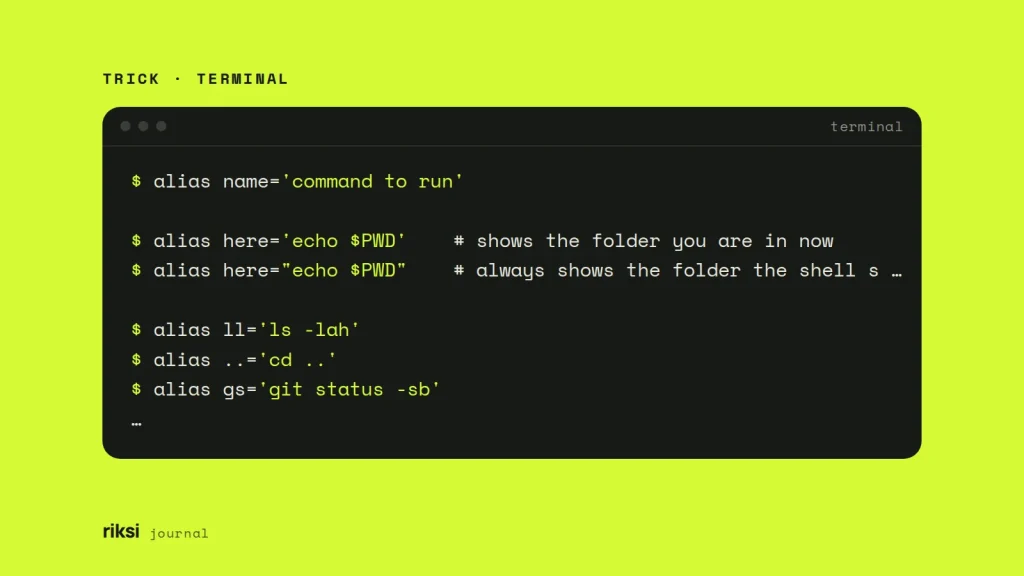
You keep typing the same long command, and you’d like a shorter name for it. That’s what an alias is for. An alias is a short name for a longer command. You create one with alias ll='ls -lah'. If you type it at the prompt, it lasts until you close the window. To keep it, add the same line to ~/.zshrc on a Mac or ~/.bashrc on most Linux systems.
How to write an alias
alias name='command to run'There must be no spaces around the =. Add a space, and the shell sees three separate words. None of them is the alias you wanted. Wrap the command in quotes. I use single quotes unless I have a reason not to. Single quotes keep variables and command substitutions as text until you run the alias. Double quotes expand them once, when you define the alias.
alias here='echo $PWD'    # shows the folder you are in now
alias here="echo $PWD"    # always shows the folder the shell started in
Here are a few aliases I find useful in a web developer’s shell.
alias ll='ls -lah'
alias ..='cd ..'
alias gs='git status -sb'
alias gl='git log --oneline --graph --decorate -20'
alias serve='php artisan serve'
alias p1='cd ~/Sites/client-one'
alias p2='cd ~/Sites/client-two'
To see what’s defined, run alias with no arguments. alias gs shows a single one. type gs tells you if a name is an alias, a function or a program on disk. That helps when a command behaves differently from what you expect.
Make aliases permanent
Aliases typed at the prompt disappear when the shell exits. It’s like writing a phone number on your hand. One wash, and it’s gone. To load them in every new window, put them in your shell’s startup file.
| Shell | File | Where you will see it |
|---|---|---|
| zsh | ~/.zshrc |
macOS, the default shell since Catalina. |
| bash | ~/.bashrc |
Most Linux distributions, and WSL on Windows. |
| bash on macOS | ~/.bash_profile |
Older Mac accounts. Terminal starts login shells, which read this file instead of ~/.bashrc. |
| fish | ~/.config/fish/config.fish |
Anywhere you have installed fish. |
Open the file and add your aliases at the end. On a new Mac, ~/.zshrc may not exist yet, but nano creates it. Save, then reload.
nano ~/.zshrc
source ~/.zshrc
Once you have more than a few, I’d keep them in their own file and load it from your startup file. This line works in both bash and zsh.
[ -f ~/.aliases ] && source ~/.aliasesOn Ubuntu and Debian, the default ~/.bashrc already loads ~/.bash_aliases if it exists. So you can put them there without touching ~/.bashrc at all. A separate file is also easy to keep in a dotfiles repository and copy to a new machine.
When an alias is not enough, use a function
An alias is plain text substitution at the start of a command. Anything you type after it is added to the end. So an alias can’t put an argument in the middle or use it twice. For that, write a small shell function in the same file.
# Make a folder and move into it
mkcd() { mkdir -p "$1" && cd "$1"; }

# Commit everything typed after the name as the message
gcm() { git commit -m "$*"; }
Now mkcd assets/images creates both folders and moves you into them. gcm Fix footer links commits with that message. Yes, a function looks scarier than an alias. These two still fit on one line each.
Aliases and functions from your startup file are for your interactive shell only. Shell scripts run in a non-interactive shell that doesn’t read ~/.zshrc or ~/.bashrc. So write the full command in the script. Don’t rely on an alias there.
Override, skip or remove an alias
- Safety aliases.
alias rm='rm -i'asks before every delete. It helps, but I wouldn’t rely on it. On a server without your aliases, the same habit deletes without asking. - Skip an alias once. Put a backslash in front (
\rm file) or usecommand rm fileto run the real program. - Remove one.
unalias llremoves it from the current session. Delete the line from your startup file to remove it for good. - In fish,
aliasworks, but I find abbreviations nicer.abbr -a gs git statusexpands as you type, so you see the full command before it runs.
A note for WSL users
WSL is the Windows Subsystem for Linux. It mounts your drives under /mnt, so C:\ is /mnt/c. An alias puts a Windows folder one word away.
alias winproj='cd /mnt/c/Users/yourname/Projects'For day-to-day work, though, Microsoft recommends keeping project files inside the Linux file system, in your Linux home folder. Tools like Git, npm and Composer are much faster there than on /mnt/c. I’d follow that advice.
My advice is to start with two or three aliases for the commands you type most. Add more when you notice yourself typing the same long command again. Before long, typing git status -sb in full will feel like hard work.
Comments
No comments yet. Questions, fixes and better ways are all welcome.