Trick 07 Tricks & hacksEveryday
How to calculate an ex-GST price in Australia
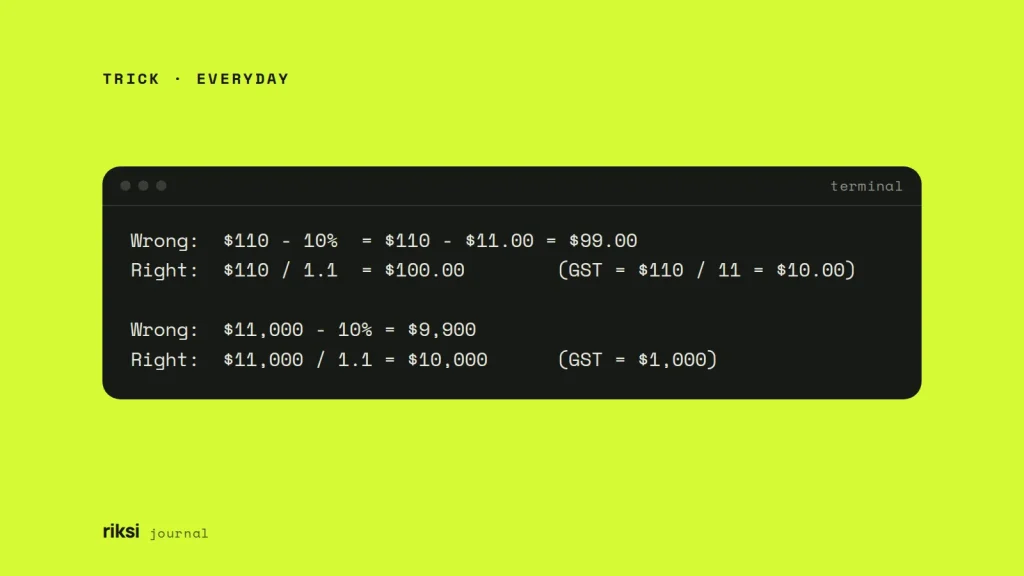
You have a price that includes GST, and you need the price without it. It’s one division. To get the ex-GST price in Australia, divide the GST-inclusive price by 1.1. That’s the same as multiplying by 10/11. To find just the GST, divide the inclusive price by 11. So $110 is $100 ex-GST plus $10 GST. I’d learn the divide-by-11 rule first, because it’s the one you’ll use most.
Why you divide by 11 and don’t take off 10%
GST is 10% of the ex-GST price, not of the price you pay. A $100 item plus 10% GST costs $110. So the inclusive price has 11 equal parts. Ten parts are the price and one part is the GST. Think of a cake cut into 11 equal slices. The seller keeps ten and the ATO gets one. That’s why the GST is one-eleventh of the total.
The ATO (Australian Taxation Office) uses the same idea. If the GST is exactly one-eleventh of the total, a tax invoice under $1,000 can just say “Total price includes GST”.
The most common mistake is to take 10% off the inclusive price. It always gives an answer that’s too low. I’d check any pricing spreadsheet you inherit for this.
Wrong:  $110 - 10%  = $110 - $11.00 = $99.00
Right:  $110 / 1.1  = $100.00        (GST = $110 / 11 = $10.00)

Wrong:  $11,000 - 10% = $9,900
Right:  $11,000 / 1.1 = $10,000      (GST = $1,000)
The error is about 0.9% of the inclusive price. That’s $1 on $110, or $100 on $11,000. On a large invoice, or over a year of bookkeeping, it adds up fast.
Formulas and worked examples
| You have | You want | Formula |
|---|---|---|
| GST-inclusive price | GST amount | price ÷ 11 |
| GST-inclusive price | Ex-GST price | price ÷ 1.1, or price − GST |
| Ex-GST price | GST amount | price × 0.1 |
| Ex-GST price | GST-inclusive price | price × 1.1 |
Worked examples
| GST-inclusive | GST (÷ 11, rounded) | Ex-GST (inclusive − GST) |
|---|---|---|
| $110.00 | $10.00 | $100.00 |
| $49.95 | $4.54 (4.5409…) | $45.41 |
| $19.99 | $1.82 (1.8172…) | $18.17 |
| $1,000.00 | $90.91 (90.9090…) | $909.09 |
| $2,750.00 | $250.00 | $2,500.00 |
Most prices don’t divide evenly by 11, so you need to round. The ATO’s rule is to round GST to the nearest cent, and half a cent rounds up. Half a cent sounds too small to need a rule. The ATO has one anyway. Work out the GST first and round it. Then subtract it from the total. That’s the order I always use. This way the ex-GST price and the GST always add up to exactly what the customer paid.
When an invoice has several taxable items, the ATO lets you pick one of two methods. You can add up the GST first and round once (the total invoice rule). Or you can round the GST on each item and add those up (the taxable supply rule). On a long invoice, the two can differ by a cent or two.
Spreadsheet formulas
These work in Excel, Google Sheets and Apple Numbers. Put the GST-inclusive price in cell A2.
B2 (GST):          =ROUND(A2/11, 2)
C2 (ex-GST):       =A2-B2
To go the other way, put an ex-GST price in A2.
B2 (GST):          =ROUND(A2*10%, 2)
C2 (inclusive):    =A2+B2
Do you work with other tax rates? Put the rate in a cell such as F1 (10%). Refer to it with an absolute reference (the $ signs), so it stays fixed when you copy the formula. Yes, those $ signs have nothing to do with dollars, even in a GST formula. Then one formula works for any rate. This one gives the tax inside an inclusive price: =ROUND(A2*$F$1/(1+$F$1), 2).
In code: work in cents
Floating-point numbers, the usual way code stores decimals, are a bad fit for prices. In JavaScript, Python and PHP, 110 / 1.1 is stored as 99.99999999999999, not 100. Some languages hide this when they print it. The computer is happy with close enough. An invoice isn’t. So I store money as whole cents and round once. I’d do the same in any language.
function splitGst(totalCents) {
  const gst = Math.round(totalCents / 11);
  return { gst, exGst: totalCents - gst };
}

splitGst(4995); // { gst: 454, exGst: 4541 }  ->  $4.54 GST, $45.41 ex-GST
The same approach works in PHP with (int) round($totalCents / 11). Only format the cents as dollars when you display them.
If you build quoting, checkout or invoicing tools, get this right from day one. It saves a painful clean-up later, and it’s the kind of detail I build into custom web apps.
Special cases to watch for
- Some items are GST-free, like most basic food, some health and education services, and exports. A receipt may mix taxable and GST-free items. If so, don’t divide the whole total by 11. Use the GST amount shown on the tax invoice.
- Some suppliers are not registered for GST. A business must register once its GST turnover reaches $75,000 ($150,000 for non-profits). Below that, many don’t register and charge no GST. Then there’s nothing to take out and nothing to claim. A tax invoice should show the supplier’s ABN and the GST.
- Other countries use the same maths with a different rate. The ex-tax price is price ÷ (1 + rate). The tax is price × rate ÷ (1 + rate). For New Zealand’s 15% GST, that’s price ÷ 1.15, and the GST is price × 3/23. For UK VAT at 20%, it’s price ÷ 1.2, and the VAT is price ÷ 6. For a 25% rate, divide by 1.25, and the tax is price ÷ 5.
For your BAS (Business Activity Statement), the ATO has a GST calculation worksheet. ASIC’s Moneysmart site also has a simple GST calculator. For anything beyond everyday pricing, such as mixed supplies or the margin scheme, check with your accountant or the ATO.
For everyday prices, divide by 11, round to the cent and subtract. That’s all you’ll need most days. It’s a tax rule short enough for a sticky note.
Comments
No comments yet. Questions, fixes and better ways are all welcome.