Reduce motion: kinder animations for every visitor
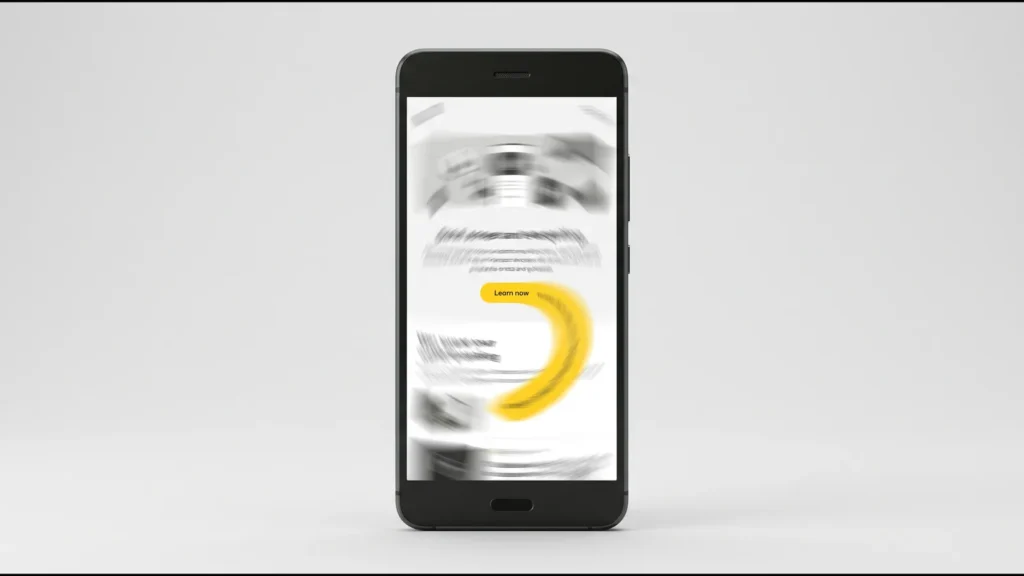
Animation makes a website feel alive. But for some people, a sliding, zooming, drifting page brings on real dizziness, nausea or a headache. The fix is simple. Keep your motion, but let people turn it off, and switch it off by default for anyone whose device already asks for less. Below I show how to do that in CSS, in JavaScript, and on a site that already has scroll animations.
First, feel the difference. Flip the switch below. The content stays the same. Only the movement goes.
<div class="rm">
<label class="sw"><input type="checkbox" id="rmc"><span>Turn on reduce motion</span></label>
<div class="stage" aria-hidden="true">
<div class="bg"></div>
<div class="hero">
<span class="eyebrow">NEW IN</span>
<strong class="big">Autumn range</strong>
<span class="banner">SALE SALE SALE SALE SALE</span>
<span class="btn">Shop now</span>
</div>
<i class="dot d1"></i><i class="dot d2"></i><i class="dot d3"></i>
</div>
<p class="cap">
<span class="full">Full motion: the background drifts, the banner slides and the dots bounce. It looks lively, but it can make some people dizzy or queasy.</span>
<span class="calm">Reduced motion is on. The page holds still. Same content, no spinning, no drift. Much kinder on a wobbly day.</span>
</p>
</div>body { display: block; padding: 16px; place-items: normal; }
.rm { width: min(100%, 680px); margin: 0 auto; color: #171915; font-family: "DM Sans", system-ui, sans-serif; font-size: 15px; }
.sw { display: inline-flex; align-items: center; gap: 12px; cursor: pointer; font-weight: 700; margin-bottom: 14px; }
.sw input { position: absolute; opacity: 0; }
.sw span { position: relative; padding-left: 60px; min-height: 44px; display: inline-flex; align-items: center; }
.sw span::before { content: ""; position: absolute; left: 0; top: 50%; transform: translateY(-50%); width: 48px; height: 28px; border-radius: 999px; background: #D7D7D7; transition: background .2s; }
.sw span::after { content: ""; position: absolute; left: 3px; top: 50%; transform: translateY(-50%); width: 22px; height: 22px; border-radius: 50%; background: #fff; box-shadow: 0 1px 3px rgba(0,0,0,.3); transition: left .2s; }
.sw:has(#rmc:checked) span::before { background: #171915; }
.sw:has(#rmc:checked) span::after { left: 23px; }
.sw input:focus-visible + span::before { outline: 3px solid #5B4AE8; outline-offset: 3px; }
.stage { position: relative; height: 300px; border: 2px solid #171915; border-radius: 16px; overflow: hidden; background: #fff; }
.bg { position: absolute; inset: -40%; background: repeating-linear-gradient(45deg, #F4F4F4 0 40px, #ECECEC 40px 80px); animation: drift 6s linear infinite; }
.hero { position: absolute; inset: 0; display: flex; flex-direction: column; align-items: center; justify-content: center; gap: 10px; text-align: center; }
.eyebrow { font: 700 13px "Space Mono", ui-monospace, monospace; letter-spacing: 3px; color: #5C5E57; animation: pulse 1.6s ease-in-out infinite; }
.big { font: 800 40px Manrope, sans-serif; color: #171915; animation: zoom 3s ease-in-out infinite; }
.banner { display: inline-block; max-width: 240px; overflow: hidden; white-space: nowrap; font: 800 15px Manrope, sans-serif; color: #171915; background: #FFD400; border-radius: 6px; padding: 4px 0; }
.banner { position: relative; }
.banner::after { content: ""; }
.btn { background: #FFD400; border: 2px solid #171915; border-radius: 999px; padding: 9px 20px; font-weight: 700; animation: bob 1.1s ease-in-out infinite; }
.dot { position: absolute; width: 16px; height: 16px; border-radius: 50%; background: #171915; }
.d1 { left: 12%; top: 22%; animation: by 1.3s ease-in-out infinite; }
.d2 { right: 14%; top: 30%; background: #FFD400; border: 2px solid #171915; animation: by 1.7s ease-in-out infinite .2s; }
.d3 { left: 20%; bottom: 16%; animation: by 1.5s ease-in-out infinite .4s; }
@keyframes drift { to { transform: translate(80px, 80px); } }
@keyframes zoom { 0%,100% { transform: scale(1); } 50% { transform: scale(1.18); } }
@keyframes bob { 0%,100% { transform: translateY(0); } 50% { transform: translateY(-8px); } }
@keyframes by { 0%,100% { transform: translateY(0); } 50% { transform: translateY(-22px); } }
@keyframes pulse { 0%,100% { opacity: .5; } 50% { opacity: 1; } }
/* the toggle: calm everything, like prefers-reduced-motion would */
.rm:has(#rmc:checked) .stage * { animation: none !important; }
.rm:has(#rmc:checked) .banner span, .banner > span { }
.cap { margin: 14px 0 0; border-left: 4px solid #FFD400; background: #fff; border: 2px solid #D7D7D7; border-left: 4px solid #FFD400; border-radius: 0 10px 10px 0; padding: 12px 16px; font-size: 15px; line-height: 1.5; }
.cap .calm { display: none; color: #171915; }
.rm:has(#rmc:checked) .cap .full { display: none; }
.rm:has(#rmc:checked) .cap .calm { display: block; }
@media (max-width: 560px) { body { padding: 10px; } .big { font-size: 32px; } .stage { height: 280px; } }Why movement can make people ill
Your sense of balance lives in your inner ear. When your eyes see big movement that your body doesn’t feel, the two signals clash. That mismatch is what makes people carsick, and a busy web page can do the same thing. The worst offenders are large shifts: parallax, where the background slides at a different speed to the text, and things that fly in or zoom as you scroll.
This is not a rare problem. People with vestibular disorders, which affect the inner ear, can be hit hard. The web accessibility guidelines put it plainly: “people with vestibular disorders need control over movement triggered by interactions“. So motion from scrolling or clicking should always be something a person can stop.
Scroll animations are here, with no JavaScript
A while back, animating things as you scroll meant JavaScript, often a heavy library. Now CSS does it on its own, with animation-timeline. It’s quick and smooth, because the browser handles it. Chrome and Edge have had it since 2023, Safari added it in version 26, and Firefox is the last to switch it on, in version 159. That puts support near every browser people use.
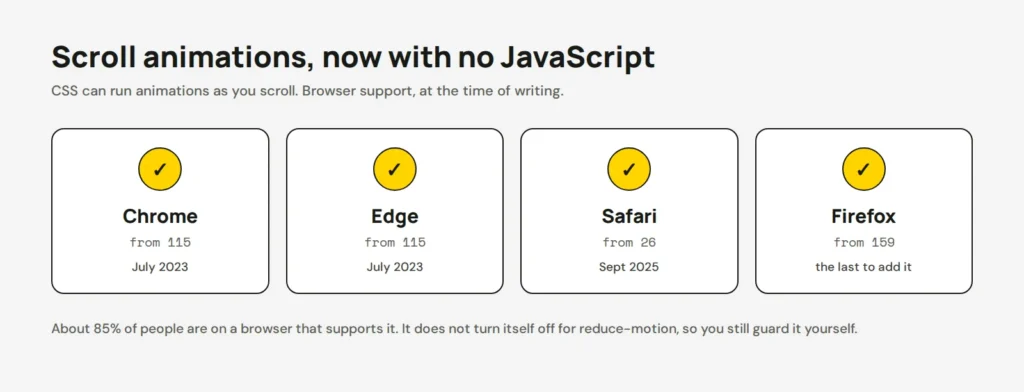
Here’s the catch. A CSS scroll animation does not turn itself off when someone asks for less motion. You still have to do that yourself. The good news is it takes a few lines. My scroll ruler sidebar and CSS anchor positioning posts show the fun side of motion. This post is the other half of the deal.
Turn motion off in CSS
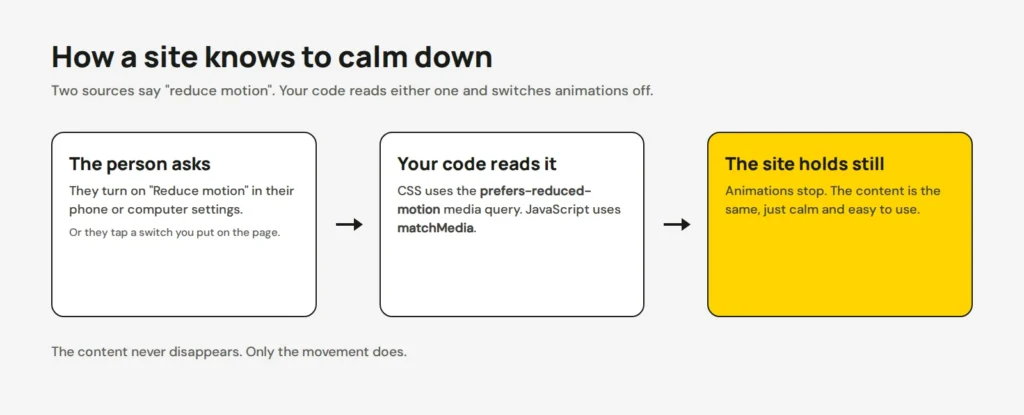
Browsers and phones have a setting called “Reduce motion”. CSS can read it with the prefers-reduced-motion media query. The way I reach for is to only add motion when nobody asked you to hold back. So the plain, still version is the default, and the animation is the extra:
/* Still by default, so it's safe for everyone */
.reveal { opacity: 1; }

/* Add motion only when the person is happy with it */
@media (prefers-reduced-motion: no-preference) {
  @supports (animation-timeline: view()) {
    .reveal {
      animation: fade-up linear both;
      animation-timeline: view();
      animation-range: entry 0% cover 30%;
    }
  }
}

@keyframes fade-up {
  from { opacity: 0; transform: translateY(40px); }
  to   { opacity: 1; transform: translateY(0); }
}
Already have a site full of animations and don’t want to rewrite them all? Drop in this safety net. It calms every animation and transition at once when the setting is on:
@media (prefers-reduced-motion: reduce) {
  *, *::before, *::after {
    animation-duration: 0.01ms !important;
    animation-iteration-count: 1 !important;
    transition-duration: 0.01ms !important;
    scroll-behavior: auto !important;
  }
}
Be careful here. This is a blunt tool, so test your buttons and menus after you add it. Some of them may rely on a transition to look right.
Turn it off in JavaScript
If your motion comes from JavaScript, check the same setting before you start it. In plain JavaScript, that’s matchMedia:
const calm = window.matchMedia('(prefers-reduced-motion: reduce)');

if (!calm.matches) {
  startAnimations(); // only run motion when it's wanted
}

// If they change the setting while on the page, start fresh
calm.addEventListener('change', () => location.reload());
Using a scroll-animation library like AOS, GSAP ScrollTrigger or a smooth-scroll tool like Lenis? Wrap the setup in the same check. One line keeps the whole library quiet for people who need calm:
if (!window.matchMedia('(prefers-reduced-motion: reduce)').matches) {
  AOS.init();
}
Add your own “reduce motion” switch
Here’s the part people forget. In my experience, many visitors never set the phone or computer option, so they never get the calm version. A button on your page gives them the choice right there. It also lets someone keep motion on everywhere else, but off on your site.
Add the button, a little CSS, and a few lines of JavaScript that remember the choice:
<button id="motion-toggle" aria-pressed="false">Reduce motion</button>html.reduce-motion *,
html.reduce-motion *::before,
html.reduce-motion *::after {
animation: none !important;
transition: none !important;
scroll-behavior: auto !important;
}const root = document.documentElement;
// Remember the choice from last time
if (localStorage.getItem('reduce-motion') === 'on') {
root.classList.add('reduce-motion');
}
document.getElementById('motion-toggle').addEventListener('click', (e) => {
const on = root.classList.toggle('reduce-motion');
e.currentTarget.setAttribute('aria-pressed', on);
localStorage.setItem('reduce-motion', on ? 'on' : 'off');
});The aria-pressed part tells a screen reader whether the button is on or off. Small touch, but it matters. My post on making buttons easy to tap covers more of this kind of care.
Check it the way a user would
Turn the setting on and walk your own site. On a Mac, it’s System Settings → Accessibility → Display → Reduce motion. On Windows, Settings → Accessibility → Visual effects → Animation effects. On an iPhone, Settings → Accessibility → Motion → Reduce Motion. Then scroll every page and watch that nothing flies, drifts or spins.
In Chrome’s developer tools you can fake it without changing your whole computer. Open the tools, press Ctrl + Shift + P, type “reduced motion” and pick Emulate prefers-reduced-motion. Then reload and check.
Motion is lovely, and most of your visitors will enjoy it. You’re not removing it. You’re adding a quiet door for the people who need one. If you’d like us to add a reduce-motion option to your site, or calm a page that already moves a lot, our site updates service covers it.
Opens in a new tab


Comments
No comments yet. Questions, fixes and better ways are all welcome.