Create and use a dynamic sidebar (widget area) in WordPress
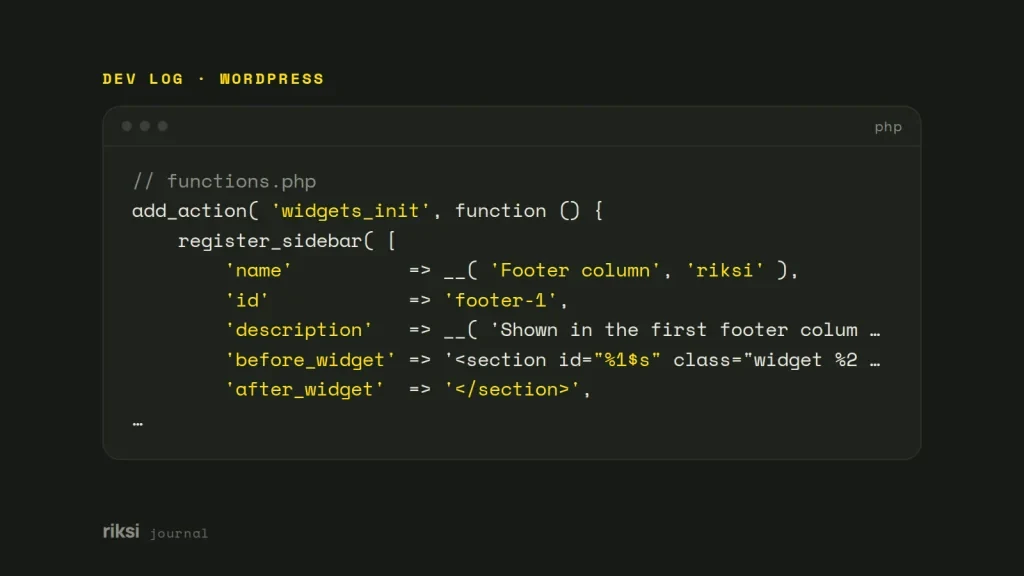
You want site owners to add their own widgets to your theme, in the footer or beside the content. Register the widget area with register_sidebar() on the widgets_init hook. Then print it in your theme with dynamic_sidebar( 'your-id' ), inside an is_active_sidebar() check. That way an empty area leaves no stray markup.
A widget area is a place where site owners add widgets. WordPress calls it a sidebar, but it can go in the header, footer, beside the content or inside it.
Register the widget area
<?php
// functions.php
add_action( 'widgets_init', function () {
	register_sidebar( [
		'name'          => __( 'Footer column', 'riksi' ),
		'id'            => 'footer-1',
		'description'   => __( 'Shown in the first footer column on every page.', 'riksi' ),
		'before_widget' => '<section id="%1$s" class="widget %2$s">',
		'after_widget'  => '</section>',
		'before_title'  => '<h2 class="widget-title">',
		'after_title'   => '</h2>',
	] );
} );
A few details save a lot of confusion later. I get these right on every new theme, because they’re hard to change once widgets are in place.
- Always set an
id, in lowercase. Without one, WordPress numbers the areas (sidebar-1,sidebar-2) in the order you register them. If you then add or reorder areas, widgets move to the wrong place. The widgets don’t get lost. They turn up in whichever area now has their old number. Since WordPress 4.2, a missing ID also raises a notice. - Keep IDs to lowercase letters, numbers, hyphens and underscores.
dynamic_sidebar()runs the value you pass throughsanitize_title()before it looks it up. So an ID likeSidebar_Namenever matches. - Set the wrappers. The default
before_widgetis an<li>, which is invalid HTML unless you print the area inside a list. I’d use a<section>or<div>instead.
Show it in the theme
Put this wherever the area belongs, for example in footer.php.
<?php if ( is_active_sidebar( 'footer-1' ) ) : ?>
	<aside class="footer-widgets" aria-label="<?php esc_attr_e( 'Footer', 'riksi' ); ?>">
		<?php dynamic_sidebar( 'footer-1' ); ?>
	</aside>
<?php endif; ?>
is_active_sidebar() returns true only when the area has widgets. So when the area is empty, the wrapper and any layout that depends on it disappear. You can also use it to change the layout, such as one column when the side area is empty. I wrap every widget area in this check.
dynamic_sidebar() prints the widgets and returns true if it found any.
A labelled <aside> gives screen reader users a landmark, which is a section of the page they can jump to. It works like the list of chapters at the front of a book. Pick a before_title heading level that fits the page outline. h2 suits most footers and side columns.
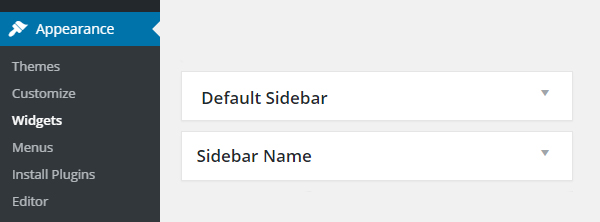
The area now shows up under Appearance > Widgets, with the name and description you gave it. This is how it looks on the classic Widgets screen.
The register_sidebar() arguments
It’s a long list for one box of widgets. You’ll set a few of them on every theme, and the rest only now and then.
| Argument | What it controls | Default |
|---|---|---|
name |
Label on the Widgets screen. | Sidebar N |
id |
Key for dynamic_sidebar() and is_active_sidebar(). |
sidebar-N |
description |
Help text on the Widgets screen. | Empty |
class |
Extra CSS class on the area in the admin Widgets screen (not the front end). | Empty |
before_widget, after_widget |
HTML around each widget. %1$s is the widget’s ID and %2$s is its class names. |
<li> list item |
before_title, after_title |
HTML around a classic widget’s title. | <h2 class="widgettitle"> |
before_sidebar, after_sidebar |
HTML around the whole area, printed only when it has widgets (WordPress 5.6+). | Empty |
show_in_rest |
Whether the area is public in the REST API (WordPress 5.9+). | false, admins only |
before_sidebar and after_sidebar can replace the is_active_sidebar() wrapper in simple cases. WordPress skips them when the area is empty.
Block widgets since WordPress 5.8
Since WordPress 5.8, the Widgets screen and the Customizer use the block editor. That includes classic themes. Each block you add to an area is stored as a widget. Your before_widget and after_widget wrap each top-level block.
Two things change for theme developers.
before_titleandafter_titledon’t apply to blocks. A heading is only a Heading block, at whatever level the editor picks. So style.widget h2,.widget h3and so on, not only.widget-title. I do this on every classic theme.- Classic widgets still work. They appear inside a Legacy Widget block and keep using your title wrappers.
If a site needs the old screen back, for example because the site owner knows it well, turn off block widgets in the theme. I’d only do this when there’s a clear reason for it.
<?php
add_action( 'after_setup_theme', function () {
	remove_theme_support( 'widgets-block-editor' );
} );
Block themes work differently. They normally register no widget areas, so there’s no Widgets screen. Headers, footers and sidebars are template parts that you edit in the Site Editor. Everything in this post applies to classic (PHP) themes.
Before you hand a site over, I’d test each widget area with a block and with a legacy widget. It only takes a few minutes, and it shows you whether the headings and wrappers look right in both. Site owners can add either kind. It’s nicer if you see the result before they do.


Comments
No comments yet. Questions, fixes and better ways are all welcome.