Guide 08 GrowSite upgrades
What is a CRM, and does your business need one?
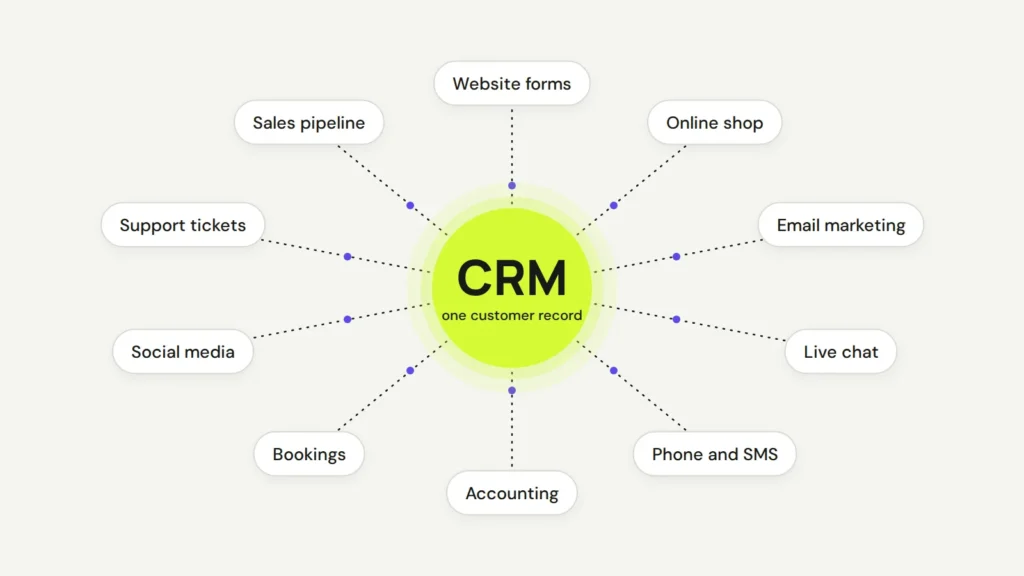
A CRM (customer relationship management) system is one place that keeps every customer, every conversation and every sale. Instead of enquiries hiding in your inbox, a spreadsheet and someone’s memory, your whole team sees the same history. And yes, you can switch from one CRM to another later. It just takes a bit of planning.
By the end of this guide you’ll know what a CRM does and whether you need one. You’ll also see how to add one to your website without starting over. Many good CRMs have a free plan to start with.
What a CRM is, in plain words
Think of a CRM as a shared address book with a very good memory. Each customer gets one record. You can see when they found you and what they asked. You can also see what they bought, and who spoke to them last.
A good CRM connects to the tools you already use. Your forms, shop, email marketing, live chat and accounting can all feed into the same record. The diagram at the top of this page shows the idea.
I’d look at these options first. Prices are at the time of writing.
- HubSpot has a free CRM for up to 2 users and 1,000 contacts, with no time limit.
- Zoho CRM has a free edition for up to 3 users, with paid plans when you grow.
- Pipedrive is built around a sales pipeline. Plans start at $14 per user a month, paid yearly, with a 14-day free trial.
Why a CRM matters for a small business
In my view, most small businesses don’t lose customers because of price. They lose them because nobody followed up. An enquiry comes in on Friday afternoon, gets buried by Monday, and the customer books someone else.
A CRM stops that. Every website enquiry lands in one list, gets an owner, and gets a reminder. HubSpot’s own pitch sums it up well: “Your data deserves better than spreadsheets.”
- No more lost leads. Form enquiries go straight into the CRM, not just into one person’s inbox.
- Better follow-up. Set tasks and reminders, so the second call happens on time.
- Your team shares one story. If someone is sick or leaves, their customers aren’t lost with them.
- You see what works. Reports show where customers come from, and which ones turn into sales.
The pros and cons
The good
- Everything about a customer in one place.
- Automatic emails and reminders save hours each week.
- Clear numbers on your leads and sales, instead of guesses.
- It grows with you, from one person to a whole team.
The not so good
- It only works if people use it. A CRM nobody updates is just an expensive address book.
- Costs grow per user and per feature. Free plans have limits, like HubSpot’s 1,000 contacts.
- Setup takes time. Fields, pipelines and connections need some thought at the start.
- It holds personal information, so you have to look after it properly (more on that below).
My take is that the pros win for almost any business that gets regular enquiries. If you only have a handful of customers a year, a tidy spreadsheet might still do the job.
Can you switch to another CRM later?
Yes. You’re not locked in forever, and that’s good news if you picked the wrong one. Most CRMs let you export your data, and most let you import it. Moving house is a fair comparison. The boxes move easily. Rebuilding the furniture takes longer.
Here’s how I’d plan a switch:
- Export everything. Download your contacts, companies and deals as CSV files from the old CRM.
- Clean it up. Delete duplicates and old junk. There’s no point paying to move rubbish.
- Map the fields. Match each column in your file to a field in the new CRM. In HubSpot, this happens in Data Management → Data Integration, and it also has a Smart Transfer tool for moving from other CRMs.
- Rebuild what doesn’t move. Automations, email templates, reports and connections to your website usually have to be set up again. Past emails and notes can be tricky too. HubSpot, for example, says existing emails, meetings, notes and tasks can’t be updated through an import.
- Run both for a short time. Keep the old one read-only for a few weeks, so nothing gets lost while the team settles in.
It’s not too late to add a CRM to your site
You don’t need a new website to start. Most CRMs plug into the site you already have. On WordPress, the HubSpot plugin adds forms and live chat that send contacts straight into the CRM. Most other CRMs connect to WordPress and Shopify through a plugin, an app or a small piece of code.
- Pick one CRM and start on its free plan or trial.
- Connect your main contact form, so every new enquiry lands in it.
- Import your existing customers from your email or spreadsheet.
- Add one simple automation, like a reminder two days after a new enquiry.
One thing to get right from day one is privacy. A CRM is full of personal information. Under the Australian Privacy Principles, businesses covered by the Privacy Act must keep it secure. They also need care when it’s stored overseas, and many CRMs store data overseas. Add a short collection notice next to your forms that says what you collect and why. Some small businesses are exempt from the Act, but not all, so check with an adviser if you’re unsure.
Want an expert to set it up?
If you’d rather not do this yourself, we can do it for you. We help you choose the right CRM and connect it to your forms and online shop. Then we move your data across and set up the first automations. We can also move you from one CRM to another without losing your history. It’s part of our site updates service.
Contact us and tell us how you handle enquiries today. I’d be happy to look at it and suggest the simplest setup that works for you.
Opens in a new tab
Comments
No comments yet. Questions, fixes and better ways are all welcome.