Guide 13 GrowSite upgrades
Connect Stripe to Xero: card payments and fees, sorted
To connect Stripe to Xero, add Stripe as a payment service in Xero. Customers can then pay your invoices by card. Xero marks each invoice paid and records the Stripe fee for you. If your website also takes Stripe payments, add the Stripe bank feed so those sales reach Xero too.
By the end of this guide, you’ll have both set up. You’ll also know how fees, GST and payouts should look. It takes about 30 minutes, plus time for Stripe to check your business details. There’s no setup or monthly fee, and your first payout takes 7 to 10 days.
Add Stripe as a payment service in Xero
I’d start here, because it saves the most time for the least work. My only tip before you begin: have your ABN and bank details ready, because Stripe asks for them.
- In Xero, go to Settings → Payment Services → Add Payment Service → Stripe. The Xero App Store calls it “Credit Cards powered by Stripe”.
- Fill in the form. Add a name, the card logos to show, the account for payments and your fee settings.
- Click Connect to Stripe, then sign in to Stripe or create an account.
Watch for two things. You can’t change the country of the Stripe account or the Xero business later. And if Xero shows “(pending authentication)”, setup isn’t finished yet.
When a customer pays, Stripe says Xero “will automatically create a spend money transaction for the Stripe fee and mark the invoice as paid”. A spend money transaction is Xero’s record of money going out. Customers have to pay the full invoice amount, though. Part payments aren’t possible.
Check what it costs in Australia
Xero lists these Stripe rates for Australian businesses, at the time of writing:
| How the customer pays | Fee |
|---|---|
| Australian card | 1.75% + A$0.30, GST included |
| International card | 3.5% + A$0.30, plus 2.2% if the currency is converted |
| PayTo (straight from their bank account) | 1.3% + A$0.30, never more than A$5 |
| Instant Payouts (faster payouts to you) | 1.5% of the payout, GST not included |
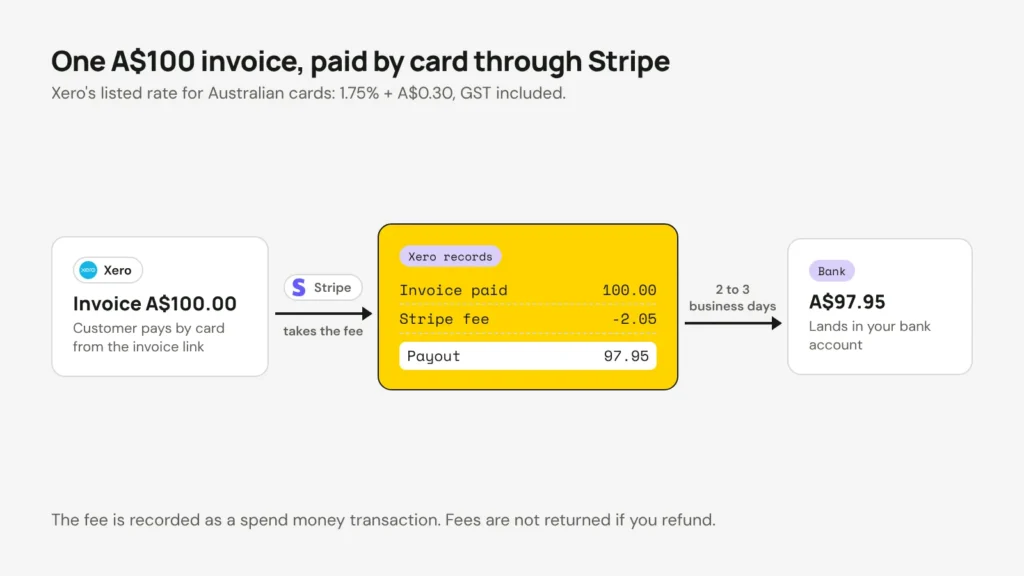
So an A$100 invoice paid with an Australian card costs A$2.05 in fees. Fees aren’t returned when you refund a payment. Stripe’s own standard rate for Australian cards is 1.7% + A$0.30. Check which rate your account is on.
Put in your own invoice amount to compare the ways a customer can pay.
Xero's listed Stripe rates for Australia, GST included (October 2026). A converted international card adds 2.2%. Your customer chooses how to pay, and fees are not returned on refunds.
GST on the fees depends on your account. Stripe says it charges GST on its fees for Australian accounts, with a monthly tax invoice. Xero’s page says Xero won’t charge you GST if you gave Stripe an ABN registered for GST. Ask your accountant which one applies to you. My guide to working out an ex-GST price shows how to find the GST part of a fee.
Add the Stripe bank feed for website sales
If your website takes Stripe payments, those sales never touch a Xero invoice. So the payment service alone won’t bring them in. The fix is to treat Stripe like a second bank account in Xero.
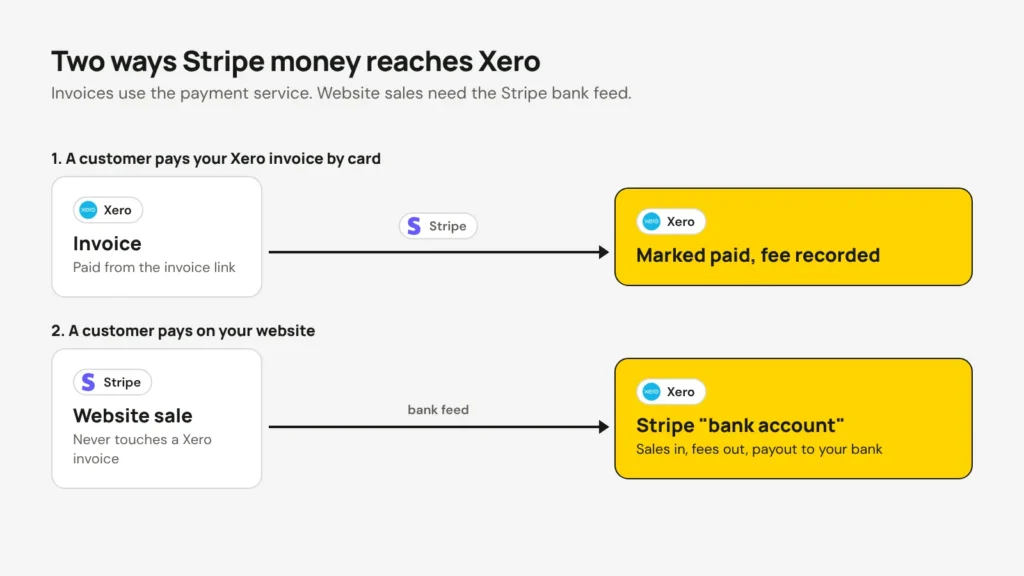
Add a new bank account in Xero and search for Stripe to connect its feed. The Stripe listing in the Xero App Store says Xero then matches payments “as they come through your Stripe bank feed”. A Bean Ninjas guide says the feed brings in sales before fees, and the fees on their own line. It’s usually two to three days behind.
I’d add the feed on the same day as the payment service, so Xero sees every sale. Each payout then becomes a transfer from the Stripe account to your real bank account. Sales go in at full price and fees go out as expenses. The Stripe account in Xero should end up with the same balance Stripe shows.
- A common mistake: recording the payout as sales. A payout is your sales minus fees.
- Your income then looks smaller than it is, and you miss the GST you could claim on the fees.
- Your books won’t balance, and that is no fun at BAS time.
Plan for subscriptions
This gap surprises a lot of people. Stripe says Xero invoicing “cannot be used with Stripe subscriptions”. There’s also no link between Stripe’s own invoices and Xero. So if you bill monthly through Stripe, nothing creates a Xero invoice for you.

You have three options:
- Use repeating invoices in Xero with auto pay. Xero sends the bill and Stripe charges the card. Auto pay only works on repeating invoices set to “approved for sending”.
- Keep billing in Stripe, and match the Stripe bank feed in Xero each month.
- Build a custom integration (a connection built just for your business) that creates a Xero invoice each time Stripe charges a subscription.
For most small businesses, I’d pick the first option. A custom integration listens for Stripe’s webhooks (short messages Stripe sends when something happens). It must also stay inside Xero’s limit of 60 requests a minute and 5,000 a day for each business. We build custom Xero integrations like this when the standard options don’t fit.
Check it after your first payout
- Send yourself a small test invoice and pay it by card. In my view, this is the most useful check of all. Look at the fee and the paid status in Xero.
- Match your first payout. Payments minus fees should equal the deposit, to the cent.
- Check how the fees are recorded for GST. Ask your accountant if you’re not sure.
- Reviews of the Stripe app in the Xero App Store are mixed. Check the connection after any change to your Stripe account.
Once both pieces are in place, card payments mostly look after themselves. You’ll spend less time chasing invoices, and more time on the work that pays them.
Opens in a new tab


Comments
No comments yet. Questions, fixes and better ways are all welcome.