Canonical URLs: fix duplicate pages for better SEO

If the same page opens at more than one address, search engines see copies. They split your links between them and pick one to show, and it may not be the one you want. A canonical URL fixes that. It is one line in the page’s code that tells Google which address is the real one.
Below I explain where the copies come from, then show you how to set canonicals on WordPress and Shopify, and how to test them.
One product, many addresses
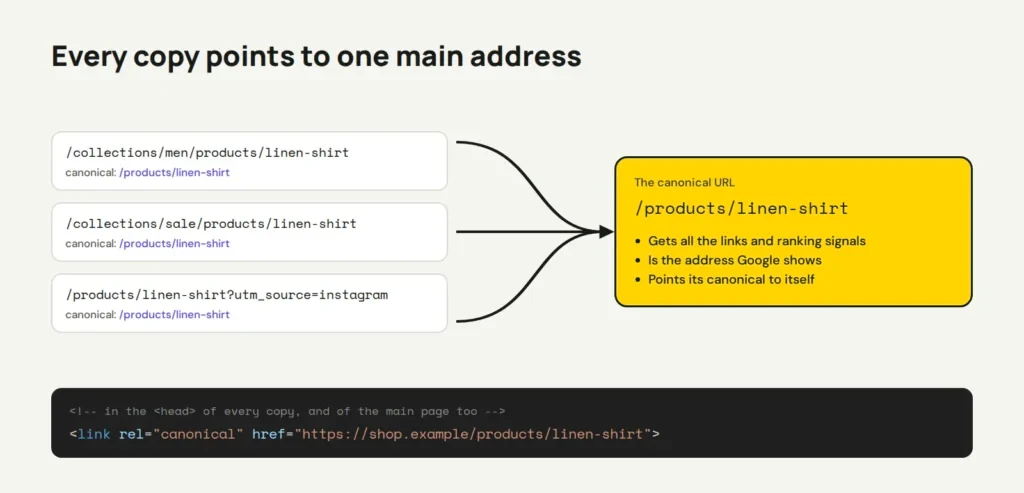
Online shops make copies without anyone noticing. Say you sell a linen shirt in your Men and Sale collections. On Shopify, the same product page opens at all of these:
/products/linen-shirt/collections/men/products/linen-shirt/collections/sale/products/linen-shirt/products/linen-shirt?utm_source=instagram, from a tracking link in a social post
Other common causes are http and https, www and no www, and sort or filter options like ?orderby=price. Google lists these in its guide to canonicalization, which is its word for picking the main address.
Duplicate content like this doesn’t get you a penalty. The problem is quieter. Every link to the shirt counts for whichever copy it points to, so no copy gets the full credit. Google may also show the sale address long after the sale has ended.
How a canonical tag fixes it
You put one tag in the <head> of every copy. It names the main address, and Google can then “consolidate the signals” from all the copies into that one URL. Switch the tag on below to see the difference.
<div class="cn">
  <p class="tg">
    <input type="radio" name="c" id="c0" checked><label for="c0">No canonical tag</label>
    <input type="radio" name="c" id="c1"><label for="c1">With a canonical tag</label>
  </p>
  <p class="cap">One linen shirt, four addresses:</p>
  <ul class="urls">
    <li class="main"><code>/products/linen-shirt</code><span class="st"></span></li>
    <li><code>/collections/men/products/linen-shirt</code><span class="st"></span></li>
    <li><code>/collections/sale/products/linen-shirt</code><span class="st"></span></li>
    <li><code>/products/linen-shirt?utm_source=instagram</code><span class="st"></span></li>
  </ul>
  <div class="sig">
    <small>Where links and ranking signals go</small>
    <div class="bars"><i class="b1"></i><i></i><i></i><i></i></div>
  </div>
  <p class="verdict"></p>
</div>
.cn { width: min(100%, 660px); }
.tg { display: flex; flex-wrap: wrap; gap: 8px; margin: 0 0 14px; }
.tg input { position: absolute; opacity: 0; }
.tg label { padding: 9px 16px; border: 2px solid #171915; border-radius: 999px; cursor: pointer; background: #fff; font-size: 15px; }
.tg input:checked + label { background: #171915; color: #F5F5F0; }
.tg input:focus-visible + label { outline: 3px solid #5B4AE8; outline-offset: 2px; }
.cap { margin: 0 0 8px; font-size: 14px; color: #5C5E57; }
.urls { list-style: none; margin: 0; padding: 0; display: grid; gap: 6px; }
.urls li { display: flex; flex-wrap: wrap; justify-content: space-between; gap: 4px 12px; padding: 9px 12px; background: #fff; border: 2px solid #D8D9D1; border-radius: 10px; transition: background .3s, border-color .3s; }
.urls code { font-family: "Space Mono", monospace; font-size: 13px; overflow-wrap: anywhere; }
.st { font-size: 13px; color: #5C5E57; }
.st::after { content: "Google guesses"; }
.sig { margin-top: 14px; }
.sig small { display: block; font-size: 12px; color: #5C5E57; margin-bottom: 6px; }
.bars { display: flex; gap: 4px; height: 26px; }
.bars i { flex: 1; border-radius: 6px; background: #C9CBC2; transition: flex .5s, background .5s; }
.bars i:nth-child(2) { background: #B3B5AC; } .bars i:nth-child(3) { background: #9A9C94; } .bars i:nth-child(4) { background: #D8D9D1; }
.verdict { margin: 12px 0 0; padding: 12px 14px; border-radius: 10px; background: #EDECE6; font-size: 15px; }
.verdict::after { content: "Google sees four copies. The links are split four ways, and Google may show the wrong address."; }
/* With canonical */
.cn:has(#c1:checked) .urls li.main { background: #D5FA35; border-color: #171915; }
.cn:has(#c1:checked) .st::after { content: "canonical → /products/linen-shirt"; }
.cn:has(#c1:checked) .main .st::after { content: "✓ the canonical (points to itself)"; color: #171915; font-weight: 700; }
.cn:has(#c1:checked) .bars i { flex: 0; }
.cn:has(#c1:checked) .bars i.b1 { flex: 1; background: #D5FA35; }
.cn:has(#c1:checked) .verdict { background: #171915; color: #F5F5F0; }
.cn:has(#c1:checked) .verdict::after { content: "Google treats them as one page. Every link counts for /products/linen-shirt, and that's the address it shows."; }
@media (max-width: 520px) { .tg label { padding: 7px 12px; font-size: 14px; } .urls { gap: 4px; } .urls li { padding: 7px 10px; } .urls code, .st { font-size: 12px; } .verdict { font-size: 14px; padding: 10px 12px; } }The main page gets the same tag, pointing to itself. Google calls the tag a strong signal, not an order. It can still pick another address if your other signals disagree, for example if all your menus link to the sale copy.
A few rules from Google’s guide that I see broken often:
- Use the full address, with
https://and your domain, not a relative path like/products/linen-shirt. - Have one canonical per page. A theme and a plugin that each add one is a common mix-up.
- Point to a page that loads normally. It shouldn’t redirect, show an error or carry a
noindextag. - Don’t use
robots.txtornoindexto hide the copies instead. Google says not to.
Set it up on WordPress
WordPress already prints a canonical tag on every post, page and product page. The core function rel_canonical() handles it, and it ignores tracking tags. Archives like category pages get no tag from core. Here’s what I check on every site:
- In Settings → General, make sure both addresses use
https://and your preferred version, with or withoutwww. The other versions should redirect to it. My Cloudflare setup guide shows the Always Use HTTPS switch that helps here. - Install an SEO plugin such as Yoast SEO or Rank Math. They add canonicals to archives too, and they replace the core tag, so you still get one per page.
- On WooCommerce, check Settings → Permalinks → Product permalinks. The default
/product/base gives each product one address, however many categories it is in. - For a page that copies another one, like a second landing page for an ad, open it in the editor. In Yoast’s sidebar, go to the Advanced tab and paste the main page’s full address into Canonical URL. Then save.
Without an SEO plugin, a few lines in your theme’s functions.php do the same job for one page. Change the ID and the address to your own:
// Point page 123 (an ad landing page) to the main services page.
add_filter( 'get_canonical_url', function ( $url, $post ) {
	if ( 123 === $post->ID ) {
		return 'https://example.com.au/services/';
	}
	return $url;
}, 10, 2 );
Set it up on Shopify
Shopify adds the canonical for you. On a collection address like /collections/sale/products/linen-shirt, the theme’s canonical_url points to /products/linen-shirt. So the tag is fine. The weak spot is your own links, which can keep sending visitors and Google to the collection copies.
- Go to Online Store → Themes. On your live theme, click … and Duplicate, so you have a backup.
- Click … and Edit code. Open
layout/theme.liquidand check that the<head>has this line. Most themes, including Dawn, already do.
<link rel="canonical" href="{{ canonical_url }}">- Search the theme files for
within: collection. Shopify’s own docs for the within filter say to “consider the SEO implications” of it, because it builds those collection addresses. - Where you find it, remove that part, so product cards link to the clean
/products/address:
<!-- Before -->
<a href="{{ product.url | within: collection }}">
<!-- After -->
<a href="{{ product.url }}">
The file name differs between themes, so trust your search results over my example. Click Save, open a collection page and hover over a product. The link should now end in /products/.
Test it in three ways
First, open the page and view its source with Ctrl + U (Cmd + Option + U on a Mac). Search for canonical. You should find one tag with the full main address.
Second, test a copy from the terminal. Add a tracking tag to one of your own addresses and look for the tag. Here’s the real result for a post on this site:
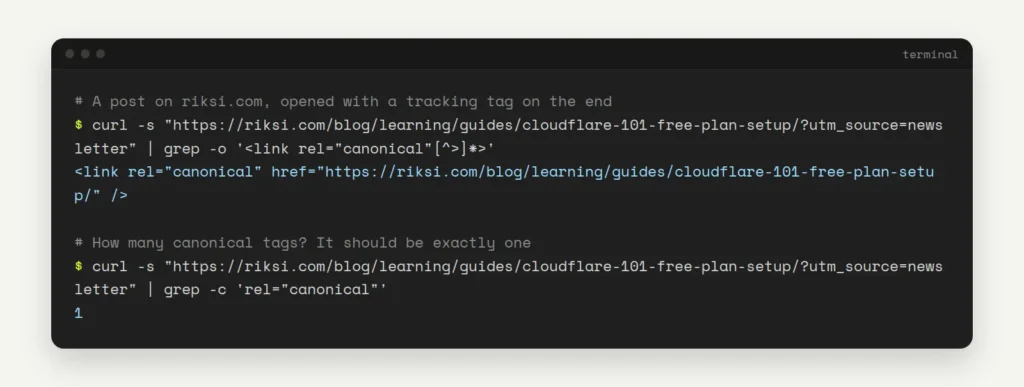
Now try the same two commands with your own address:
curl -s "https://example.com.au/products/linen-shirt?utm_source=test" | grep -o '<link rel="canonical"[^>]*>'
curl -s "https://example.com.au/products/linen-shirt?utm_source=test" | grep -c 'rel="canonical"'
The first command should print the clean address. The second should print 1. If it prints 2 or more, two tools are adding a tag. For more terminal checks, see how to check redirects and headers with curl.
Third, ask Google. In Google Search Console, paste a copy’s address into the URL Inspection tool. Compare the User-declared canonical (your tag) with the Google-selected canonical (Google’s choice). When they match, you’re done. When they don’t, check which address your menus and sitemap link to.
Canonicals are one of those small fixes nobody sees, and that is the point. If you’d like us to check yours as part of a wider SEO review, have a look at our site updates service.
Opens in a new tab


Comments
No comments yet. Questions, fixes and better ways are all welcome.